
website maintenance services
Website maintenance services for WordPress, WooCommerce and custom sites
- A fresh backup ahead of each weekly round
- Core, plugin and theme updates applied to a staging copy first
- The live pages checked after every round
- Plugins that have fallen far behind, brought current on the copy before the live site
- A monthly note covering updates, catches and upcoming jobs
Overview
Website maintenance services, one week at a time
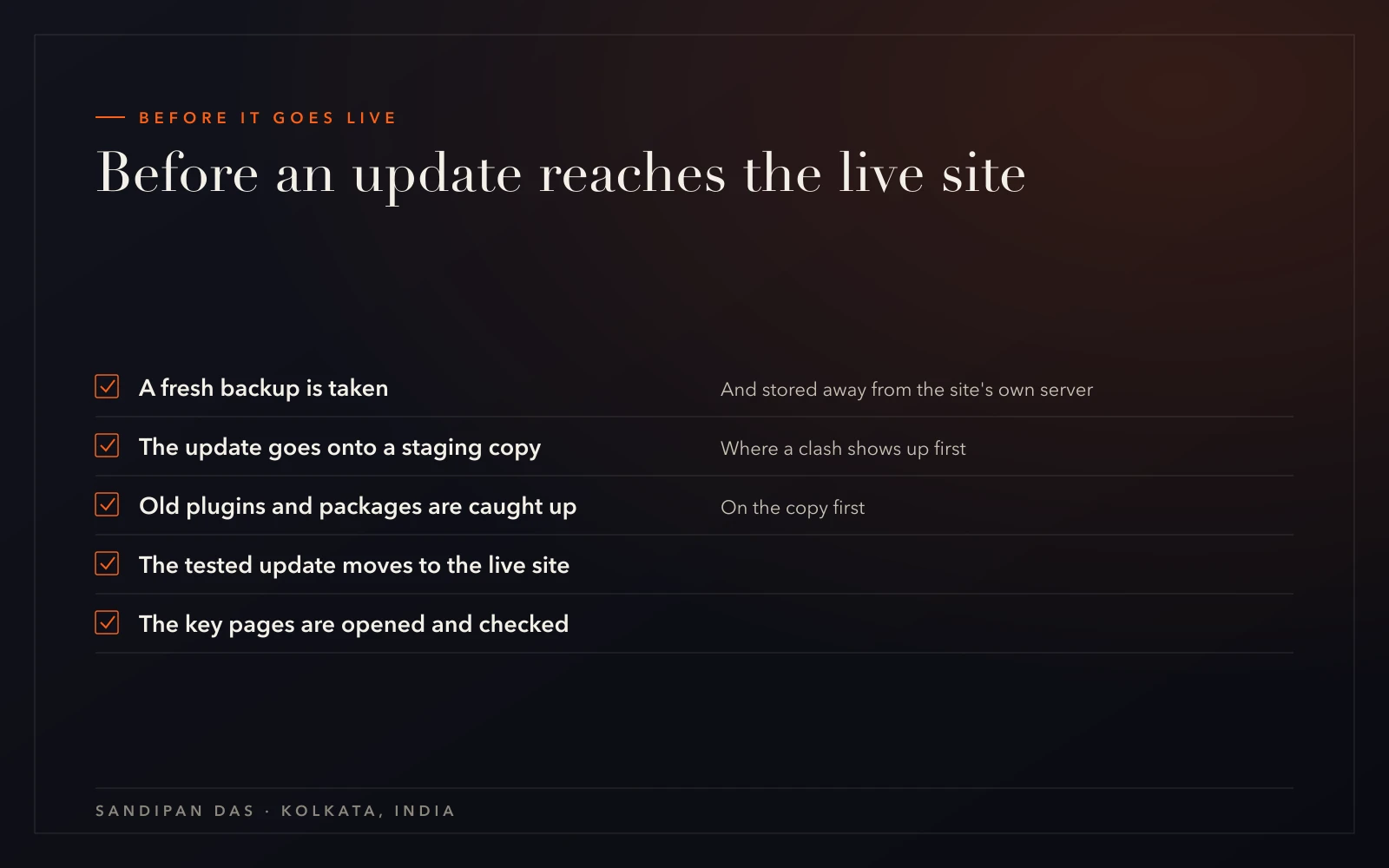
Website maintenance services keep the software behind your site current, a week at a time. Each week the team backs the site up first. Then the updates go onto a staging copy, and only after that do they reach the live site. Finally, someone opens the pages and checks they still work.
On WordPress, each round updates the core first, then every plugin and the theme. On a Next.js or Node site, it covers the packages the code depends on.
The job is to keep the site you already have on software that's still supported.
- WordPress maintenance services covering the core, each plugin and the theme
- Package updates for Next.js and Node sites
- A backup before every round, stored away from the site's own server
- Each round tested on a spare staging site ahead of the real one
- The live pages opened and checked once the round is done
What a scope from me looks like
What a maintenance scope looks like on paper
Included
- A fresh backup ahead of each weekly round
- Core, plugin and theme updates applied to a staging copy first
- The live pages checked after every round
- Plugins that have fallen far behind, brought current on the copy before the live site
- A monthly note covering updates, catches and upcoming jobs
Phase two
- A redesign of the site
- New pages or features
- Moving to another host
Not doing
- Wix or Squarespace sites, where the files are out of reach
Maintenance gets a written scope as well, signed before the first round. Anything you want beyond its lines is quoted separately, and nothing starts until you've agreed.
The scope is for the site as it is. A fresh design or a new feature is a job of its own, quoted separately.
Process
How a site joins the weekly round
The first rounds on a site are about catching up. Once the site runs on current versions, every week looks the same.
- 01
Tell me about the site
I doYou describe the platform, the host and how long it's been since the last update. That last answer decides how much catching up comes first.You doSend the site address and the platform it runs on.You get: An honest view of how far behind the site is - 02
A scope to sign
I doThe lines of the work are written down: what gets updated, how the backups are kept, and what the monthly note will cover.You doRead the scope and sign it.You get: A signed maintenance scope - 03
Access and a first backup
I doBefore anything changes, a full copy of the site goes somewhere other than the server it runs on.You doShare the admin and hosting logins.You get: A backup kept safely off the server - 04
Catching up on a copy
I doThe overdue updates go onto a staging copy first. A plugin that's years out of date, or a Next.js package several major versions back, gets sorted out there.You doApprove removing anything the site no longer uses.You get: A staging copy running on current versions - 05
Moving it live
I doThe tested updates go to the live site, and the team opens the key pages to check them.You doLook over the pages that matter most to your business.You get: A live site on supported software - 06 · ongoing
Every week after that
I doThe same round runs again each week, starting with the backup. Once a month you get a short note: the updates applied, anything caught, and the jobs ahead.You doTell the team if anything on the site looks wrong.You get: A monthly note on the work

- Tell me about the site
- A scope to signboth
- Access and a first backup
- Catching up on a copy
- Moving it live
- Every week after that
Why it matters
Why every update goes to a staging copy first
I put every update on a staging copy ahead of the live site. My reason is simple. A clash between two pieces of software shows up there, where no customer can see it.
On WordPress, the clash usually comes from a plugin left alone for years meeting the newer PHP version a host has moved to. On Next.js, it tends to be a package that has slipped several major versions behind. Both are found on the copy, and fixed there.
What takes longer than people expect is the catching up. On a site that's far behind, the overdue updates are worked through on the copy first. So the first rounds carry far more work than the weekly ones that follow.
If you only do one thing yourself, take a backup first. An update can be undone from a good backup. Without one, there's nothing to go back to.
Comparison
Maintenance next to care, management and support
Website maintenance is the technical work on its own. Three of our other services build on it, and each answers a different question.
A website care plan bundles this work with monitoring and small fixes as one package. Website management goes further and handles your pages, products and content edits too. Website support is a developer team you send your own requests to.
For a site that's simply falling behind on updates, maintenance by itself is usually the right call. Move up to the care plan when you also want someone watching the site between rounds.
| CRITERION | The service that answers it |
|---|---|
| Can someone keep my site's software current and safe to update? | Website maintenance |
| Can I have the updates, backups and alerts in one plan with one report? | Website care plan |
| Can someone also change my pages, products and content? | Website management |
| Can I send my own list of jobs to a developer team? | Website support |
Client feedback
Clients who said they'd work with the team again
- ★★★★★
“This is the second website he has created for us. He is professional and communicative and delivers beautiful work quickly.”
- ★★★★★
“Very professional Team and well prepared. I will definitly hire him and the team again.”
- ★★★★★
“Sandipan was fantastic to work with. He was professional, responsive, and skilled. I will recommend him and most likely use his services again.”
Pricing
Website maintenance cost: what sets the monthly figure
The scope sets the cost of website maintenance, and four things shape the scope. The pricing explainer shows how those lines turn into a quote.
Online stores have their own page, ecommerce website maintenance. A redesign or a new feature isn't part of the monthly figure; each one is quoted before the work starts.
- The platform the site runs on: WordPress, WooCommerce, Next.js or Node
- How many plugins or packages the site carries
- How far behind on updates the site has fallen
- Whether the site is an online store
Next step
Tell us how far behind the site is
Book a call with the site address, and the date of its last update if you know it. That's enough to work out where the first round should start.
What does website maintenance include?
- Website maintenance includes a backup before each round of updates, the updates themselves tried on a staging copy, and a check of the live pages afterwards. The round runs every week. A monthly note sums up the updates, anything that was caught and the jobs coming up.
Do websites really need regular maintenance?
- Websites need regular maintenance because the software under them keeps moving. A plugin left alone for years can clash with a newer PHP version on the host, and a Next.js site can drift several major versions behind. Weekly updates keep those gaps small enough to close safely.
How much does website maintenance cost per month?
- Website maintenance cost per month depends on the scope written for the site. The platform, the number of plugins, how far behind the updates are and whether the site is a store all change it. The pricing explainer at /quote shows how a scope is built, and the figure comes from that scope.
Can a website maintenance company take over a site another developer built?
- A site built by another developer can move onto maintenance after a review of what's there. The review covers the plugins, the theme, the hosting and the backups. Notes from whoever built it are useful, though the work can begin without them.
Are your website maintenance services India-only, or do you work with clients in the US, UK and Canada?
- The team in Kolkata, India, maintains sites for clients worldwide, remotely, and has clients in 19% of the world's countries. Logins are shared online, so the round runs the same wherever the site's owner happens to live. The team works on your schedule, in your time zone.
Published · Updated