
Frontend Development
Claude Code design skills: 5 free tools to fix AI-looking UI
Build an app with Claude Code or Cursor and the code usually works. Then you open the page, and anyone can tell an AI made it.


Why does a UI built with Claude Code look AI-made?
Because nobody gave the AI a design to follow. Without one, it falls back on the patterns it has seen most often: Inter for every piece of text, purple-to-blue gradients, and an icon tile above every heading. It also can't see the page it built, so nothing checks how it looks in a real browser.
That isn't really Claude Code's fault, or Cursor's. Ask any coding agent for "a landing page" with no other guidance and you get the average of thousands of landing pages. The makers of Impeccable, one of the tools below, list the same tells in their README: "Inter for everything. Purple-to-blue gradients. Cards nested in cards." The code works. The page just looks like every other AI-built page.
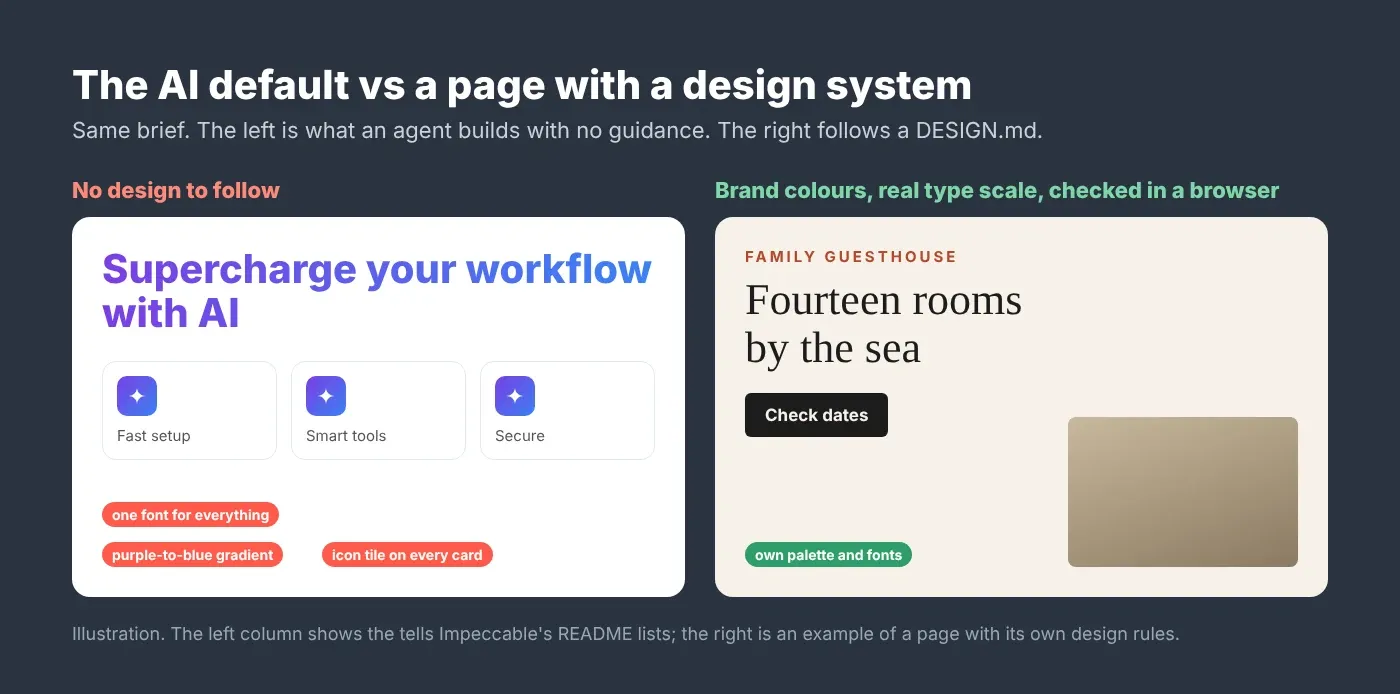
The fix is two things the agent is missing: a design to copy and eyes to check its work. The five free tools below, all public on GitHub, give it both. A "skill" here means a folder of instructions an agent like Claude Code loads when it needs them. An "MCP server" is a small add-on that gives the agent a new ability, such as using a browser.
The five tools at a glance
Each tool fixes a different gap. Two give the agent taste, two check its work, and one lets it see the page.
Tool | What it fixes | Made by | Licence |
|---|---|---|---|
awesome-design-md | No design system: gives the agent one to copy | VoltAgent | MIT |
Impeccable | Generic "AI slop" patterns, plus a design vocabulary | pbakaus | Apache-2.0 |
Taste Skill | No art direction: picks a real visual direction first | Leonxlnx | MIT |
Web design guidelines | UX and accessibility mistakes in the code | Vercel Labs | Not listed on the repo |
Playwright MCP | The agent can't see the page it built | Microsoft | Apache-2.0 |
I checked each repository and install command on 31 October 2026. These projects change fast, so read each README before you install.
The five tools, one by one
Use them in this order: give the agent a design, build with taste, clean up the slop, audit the details, then let it look at the result.
1. awesome-design-md: a real design system to copy
awesome-design-md is a collection of DESIGN.md files. Each one is a plain text description of how a well-known site looks, including Stripe, Linear and Vercel. A design system is the set of rules behind a site's look: colors, fonts, spacing, corner radius, and shadows. Each file covers the color palette with hex codes, typography, components like buttons and cards, layout and spacing, shadows, and a list of do's and don'ts.
How to use it: copy one site's DESIGN.md into your project's root folder, then tell your agent to use it. No install needed.
One honest note: these files are the project's own analysis of public websites. They aren't official files from Stripe or Linear. Use one as a starting point, then change the colors and fonts so your app looks like your brand, not like a copy of someone else's.
2. Impeccable: catch the AI look before it ships
Impeccable gives your agent words for design moves and a reviewer that checks the result. It has 24 commands. A few useful ones: /impeccable critique scores the design against usability rules, /impeccable audit checks accessibility, performance, and responsive behavior, /impeccable bolder livens up a safe design, and /impeccable polish is the final pass before you ship.
It also has a slope detector: 62 fixed rules that flag the usual AI tells, plus problems like cramped padding and skipped headings. It needs no AI model and no API key. It works with Claude Code, Cursor, Codex CLI, and many other agents.
# Terminal, in your project root (impeccable 4.8.0)
npx impeccable install
# reload your coding tool, then inside the agent:
/impeccable init
Its README says it is strongest on pages that already exist, so point it at a page or a component and improve it step by step.
3. Taste Skill: give the agent an art director's eye
Taste Skill makes the agent choose a visual direction before it writes any code. Version 2 is built on a study of 247 hand-picked sites. For each brief, it offers three of 20 researched directions; the agent picks one, builds with real, credited photos from open collections, then checks the page in a real browser at three screen widths and fixes the top problems.
# Terminal (skills CLI 1.7.4; needs Node 22+ and Chrome, Edge or Chromium)
npx skills add https://github.com/Leonxlnx/taste-skill --skill "design-taste-frontend"
Know the cost before you run it. The README says a full build takes roughly 30 to 45 minutes and a few hundred thousand tokens. That's fine for a homepage you care about, and too much for a quick internal tool.
4. Vercel's web design guidelines: fix the UX mistakes
A page can look good and still be hard to use. The web-design-guidelines skill in Vercel's agent-skills collection reviews your UI code against more than 100 rules covering accessibility, forms, focus states, animation, images, touch and dark mode.
The rules come from Vercel's Web Interface Guidelines. Three examples: tap targets smaller than 24px should be made at least 24px (44px on mobile), "never disable browser zoom", and a loading button should show a loading indicator and keep its label.
# Terminal (installs Vercel's skills collection)
npx skills add vercel-labs/agent-skills
Then ask your agent something like "review my UI" or "check accessibility", and it uses the skill.
5. Playwright MCP: let the agent see the page
This is my favorite of the five. Playwright MCP from Microsoft lets the agent open a real browser, go to your page, click things, fill in forms and take screenshots. So it can spot a close button that sits outside its card, or a button that covers text, and fix it before you see it.
# Terminal (Claude Code; @playwright/mcp 0.0.84)
claude mcp add playwright npx @playwright/mcp@latest
Two things to know. By default, it reads the page as a structured outline (an accessibility snapshot) rather than as a picture, which is faster and more reliable for clicking. And Microsoft's README says coding agents may get on better with the Playwright CLI and skills, because they use fewer tokens. Try the MCP first; switch if your sessions run out of room.
How to use them together
Treat them as one loop, not five separate add-ons: design rules in, build, clean, audit, look, repeat.
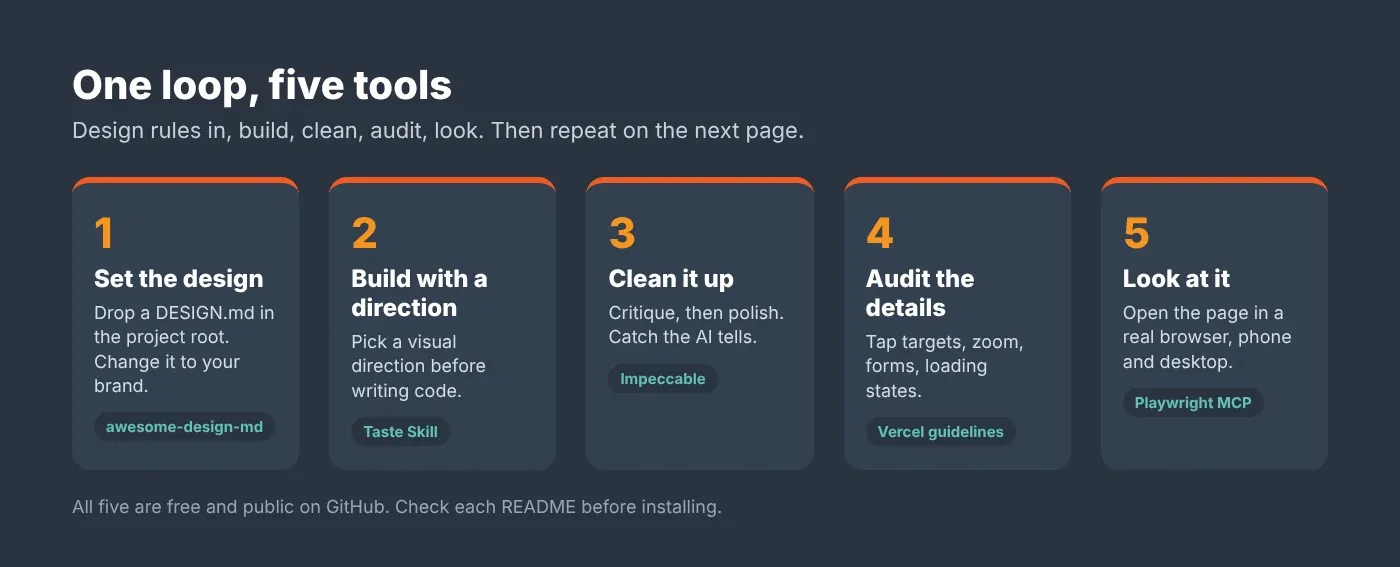
Set the design. Drop a DESIGN.md into the project root, then change the colors and fonts to your brand.
Build with a direction. Use Taste Skill for a page that needs to stand out, or ask for the page as normal for a simple screen.
Clean it up. Run
/impeccable critique, then/impeccable polishon the page.Audit the details. Ask the agent to review the UI with Vercel's guidelines and fix what it finds.
Look at it. Have the agent open the page with Playwright MCP at phone width and desktop width, and fix what it sees.
What's easy to get wrong
Four mistakes, in the order people usually make them.
Copying a brand too closely. A DESIGN.md is a starting point. Your app should look like your business, not like Stripe.
Installing everything on a small project. Taste Skill alone can use a few hundred thousand tokens per build. For an admin screen, a DESIGN.md and one audit is enough.
Trusting a design score. A tool's score tells you what its rules found, not whether your customers like the page. Look at it yourself, on a real phone.
Skipping the browser check. Code that looks right can still break on a small screen. The agent can only fix what it can see.
The AI isn't bad at design. It just has no design to follow and no eyes to check its work. Give it both.
If your AI-built site is already live and you want to know what real visitors run into, my website audit checks the same UX and accessibility issues on live pages.
Read next
How to add a custom font in Next.js: the first step away from Inter everywhere
If you'd rather have someone do this
My team and I have completed more than 900 projects since 2017, including Next.js and React apps. If your AI-built app works but doesn't look like your brand, we can set up the design system, clean up the UI, and check it on real devices. Book a short call.
Questions
Questions this post answers
Why do apps built with Claude Code all look the same?
- Without a design to follow, a coding agent falls back on the most common patterns it has seen: Inter for all text, purple-to-blue gradients and an icon tile above every heading. It also can't see the page it built. Give it a design system, such as a DESIGN.md file, and a way to check the page in a real browser.
What is a DESIGN.md file?
- A DESIGN.md is a plain text file that describes how a site should look: colours with hex codes, fonts, spacing, components, shadows, and do's and don'ts. You put it in your project's root folder and tell your coding agent to follow it. The awesome-design-md collection has ready-made ones based on sites like Stripe, Linear and Vercel.
Are these design skills free to use?
- Yes. All five are free and public on GitHub. awesome-design-md and Taste Skill use the MIT licence, and Impeccable and Playwright MCP use Apache-2.0. Running them still uses your AI tokens, and Taste Skill can use a few hundred thousand tokens for one full page build, so check the cost before you start.
Do these tools work with Cursor as well as Claude Code?
- Mostly, yes. Impeccable lists Claude Code, Cursor, Codex CLI, GitHub Copilot and many more. Playwright MCP has setup steps for Claude Code, Cursor, VS Code and others. A DESIGN.md works with any agent, because it's just a text file. Check each README for the exact steps for your editor.
What does Playwright MCP do for front-end work?
- It gives your coding agent a real browser. The agent can open your page, click buttons, fill in forms and take screenshots, so it can spot layout problems, like a button covering text, and fix them. By default it reads the page as a structured outline, which is faster and more reliable for clicking than working from pictures.