SEO for Developers
Why your link preview shows the wrong image: the fix
You fixed your Open Graph tags, shared the link, and the preview still shows the old picture. Or your headshot. Or nothing.

What are Open Graph tags?
Open Graph tags are short lines of code in a page's head that tell apps like Facebook, LinkedIn, X and WhatsApp what to show when someone shares the link: the title, a short description, the image and the page address. If they are missing or wrong, the app guesses, and usually guesses badly.
The Open Graph rules list four tags every page needs: og:title, og:type, og:image and og:url. If a page has an og:image, the rules say it should also have og:image:alt, a description of what is in the picture (not a caption). Most pages need this block:
<meta property="og:title" content="Why your link preview shows the wrong image" />
<meta property="og:description" content="The image size each app uses and how to clear its cache." />
<meta property="og:type" content="article" />
<meta property="og:url" content="https://www.example.com/blog/link-preview" />
<meta property="og:image" content="https://www.example.com/images/link-preview-share.jpg" />
<meta property="og:image:width" content="1200" />
<meta property="og:image:height" content="630" />
<meta property="og:image:alt" content="A phone showing a link preview card with the wrong picture" />
<meta name="twitter:card" content="summary_large_image" />
Replace every value with your own. The width and height must be the real size of your image file, not numbers copied from this example.
Most broken previews don't have missing tags. The tags are there, but they point to the wrong address, the wrong image, or an old copy the app saved.
How a link preview gets built
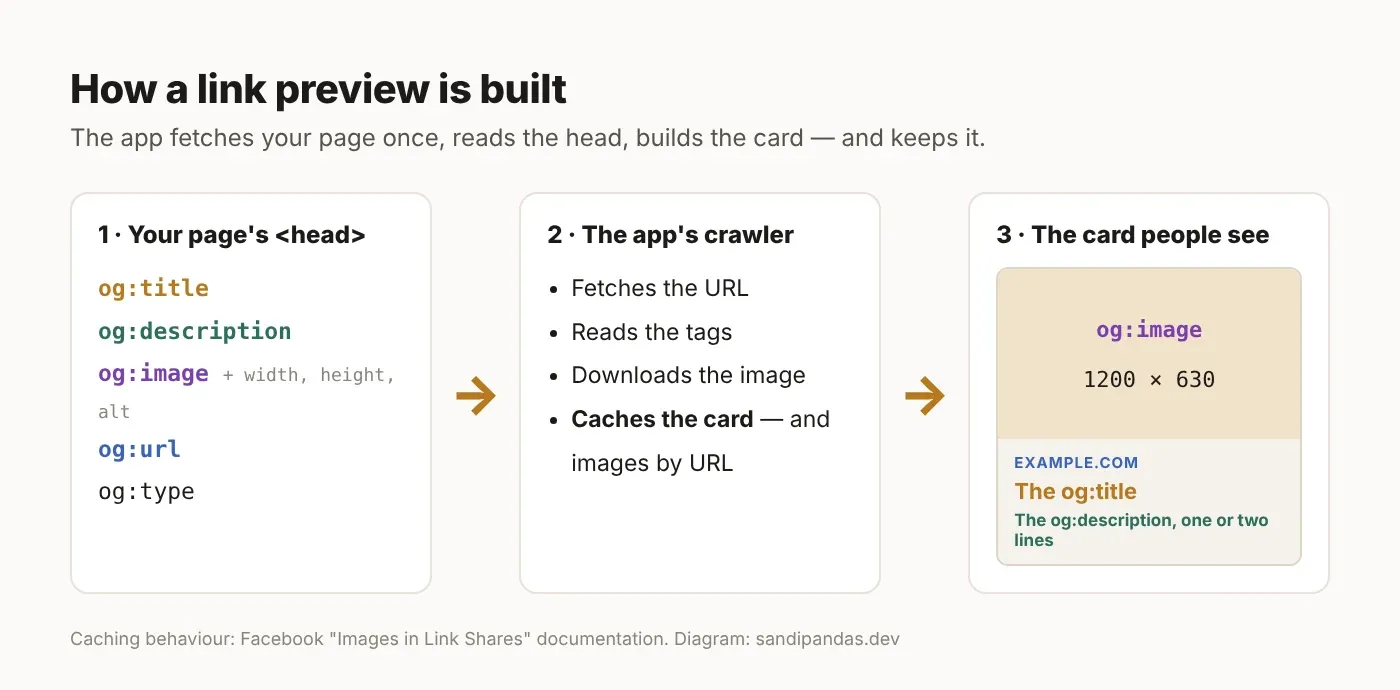
An app's crawler (a bot that visits your page) reads the head of your page once, builds the card, and saves a copy. After that, people see the saved copy, not your page.
Facebook explains this in its guide to images in link shares. The first time a link is shared, its crawler saves the page details. It has to see an image at least once before it can show it, so the first person who shares may see no picture. Adding og:image:width and og:image:height lets it show the image straight away. Facebook also saves images by their address, so if you replace an image but keep the same file name, the old picture stays.
So when a preview looks wrong, the problem is in one of three places: the tags on your page, the image they point to, or the copy the app saved. Check them in that order.
The image size each app asks for
One 1200 × 630 JPG under 5 MB works on Facebook, LinkedIn and X. Keep the important words and faces in the middle, because X uses a slightly wider shape and some apps crop.
App | Size in its own docs | Shape | File limit | How to refresh its saved copy |
|---|---|---|---|---|
Use images at least 1200 × 630 for the best display; at the minimum 600 × 315 for large link images; smallest allowed 200 × 200 | Keep close to 1.91:1 | Must not go over 8 MB | Sharing Debugger → "Scrape Again" | |
Minimum 1200 × 627 | Recommended 1.91:1 | 5 MB maximum | ||
X | Minimum 300 × 157, maximum 4096 × 4096 | 2:1 | Under 5 MB; JPG, PNG, WEBP or GIF; no SVG | No public refresh tool (see below) |
No official numbers published | Not documented | Not documented | No refresh tool (see below) |
Sources: Facebook, LinkedIn. The X figures come from X's card docs, which have since moved; the old page no longer opens (checked 31 October 2026).
A few things the table can't show:
X's shape is 2:1, not 1.91:1. A 1200 × 630 image is a little taller than 2:1, so X may trim a thin strip from the top and bottom. Keep text away from the edges.
X warns against one image for every page. Its docs say not to use a generic image such as your logo or author photo that appears on many pages. I'll come back to this, because I did exactly that.
X and WhatsApp have no public refresh tool. It isn't in their docs, but it's widely reported that both keep a saved card for a while, and that WhatsApp may skip images with a large file size. Keep the image to a few hundred KB. To get a fresh card, share the link with a small extra bit on the end, like
?v=2, which they treat as a new address.LinkedIn only refreshes new posts. Post Inspector updates the preview for new shares. Posts already published keep the old card.
What I found on my own site
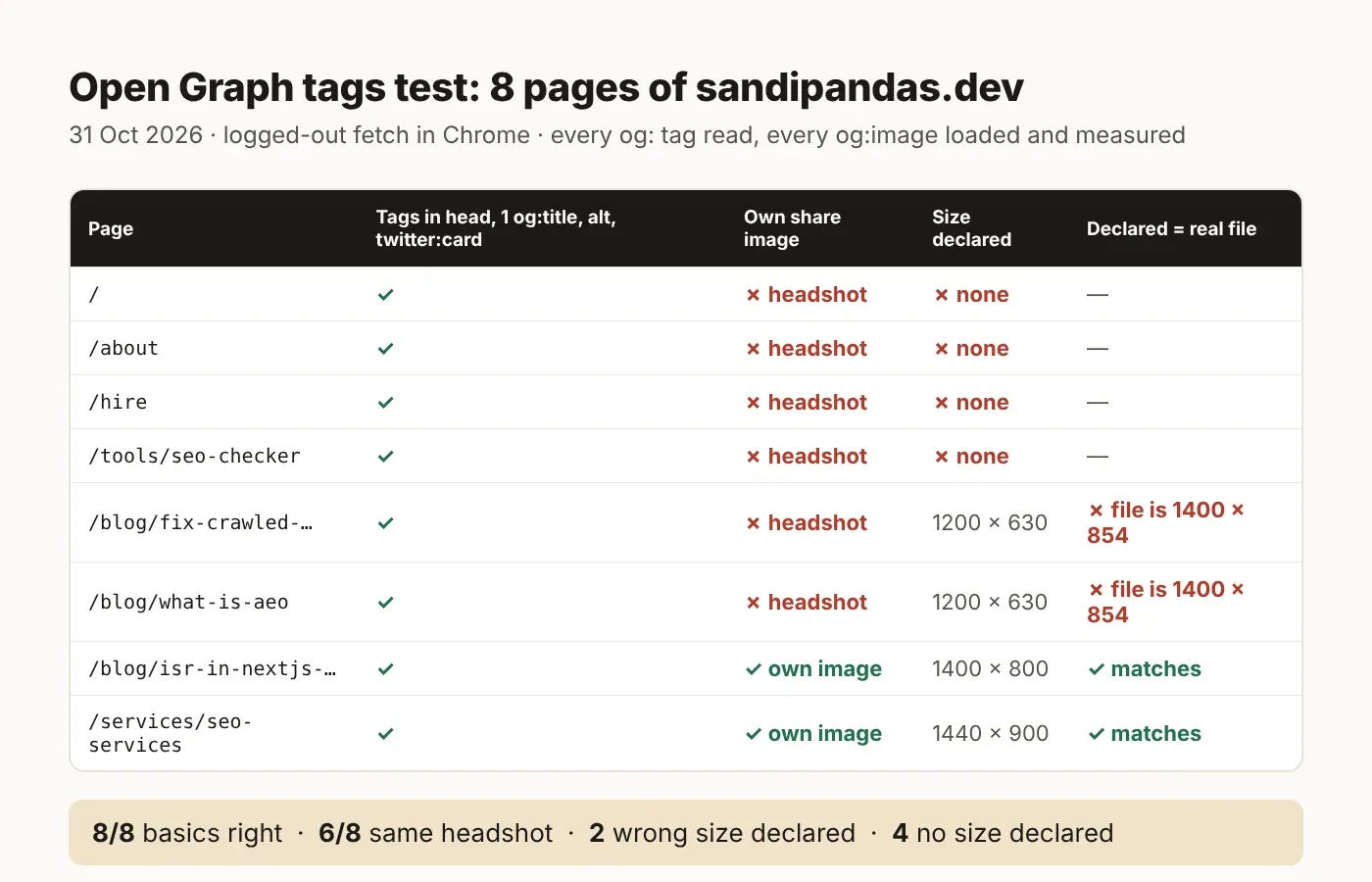
On 31 October 2026 I checked eight live pages of sandipandas.dev while logged out: the tags were all there, but the images and addresses had problems. Then I checked this post itself and found three more.
The first check covered the homepage, About, Hire, the SEO checker tool, the SEO services page and three blog posts. I opened each one in Chrome without cookies, read every og: and twitter: tag, and opened each og:image to measure its real size.
8 of 8 had the basic tags: one
og:title, a description, image alt text, andtwitter:cardset tosummary_large_image.6 of 8 used the same image, my headshot, including two blog posts. That is exactly what X's docs warn against. Shared side by side, those posts look the same.
2 posts said their image was 1200 × 630, but the file was 1400 × 854.
4 pages gave no image size at all, so Facebook can't show their image on the first share.
Logged in, one post showed the homepage's tags. My dashboard's preview mode swapped them. Logged out, it was fine.
Then I checked this post itself, and it broke three of its own rules:
Its
og:urland canonical usesandipandas.devwithout "www", and that address redirects to the www version. A canonical (the address you tell Google is the main one) should never point to an address that redirects. This comes from my site's template, so it needs a code change. Until then, this page breaks its own rule.Its share image was a WebP file, while the post tells readers to export a JPG. I've swapped it for a JPG.
Its share image alt text is just the title plus "cover image", which says nothing about what's in the picture. This also comes from the template and needs a code change.
What I did not test: all of the above was checked in a normal browser. Crawlers don't run JavaScript and send their own user agent (the name a visitor gives the server), and Next.js can send different HTML to them. So a browser check is not proof of what Facebook or LinkedIn sees. The Sharing Debugger and Post Inspector checks are the ones that count.
Why your preview looks wrong: the causes, in order
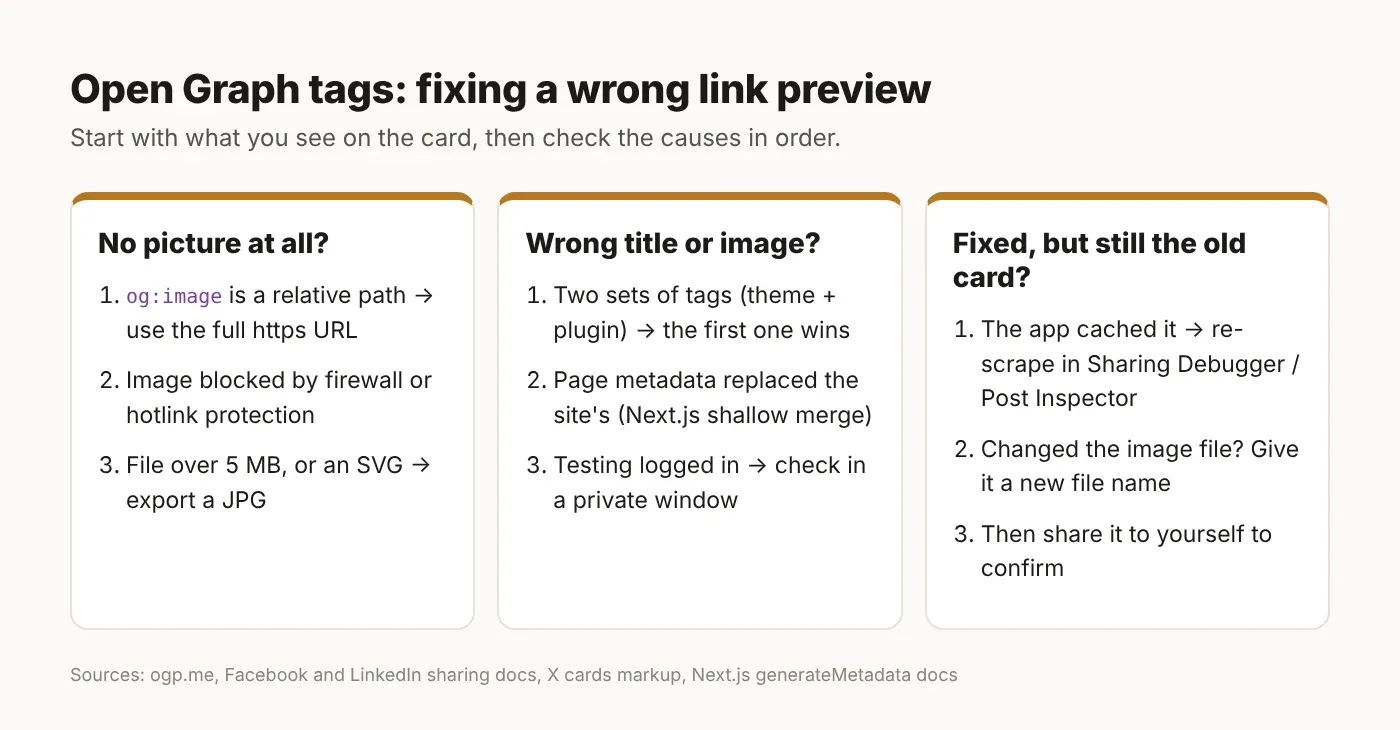
Seven causes, in the order I'd check them. The first three take a minute each.
The image address isn't a full address.
og:imageneeds the wholehttps://address, not/images/share.jpg. In Next.js, a short path only works ifmetadataBaseis set; without it, the Next.js docs say you get a build error.The page or image address redirects. If
og:url, the canonical or the image address sends the crawler somewhere else first (http to https, or no-www to www), the app may save the wrong address or skip the image. Pick one address for your site and use it everywhere.The app is showing its saved copy. Refresh it with the tool in the table above. If you changed the image, give the new file a new name, because Facebook saves images by address.
Two sets of tags. A theme and an SEO plugin both print
og:title. The Open Graph rules say the first tag from the top wins when there's a clash, though each app decides for itself, so the one you edited may be ignored.The crawler is blocked. A
robots.txtrule, a firewall, bot protection (like Cloudflare's bot settings) or hotlink protection can stop the crawler from reading the page or the image. So can an image stored somewhere private.The image is too heavy or the wrong type. Over 5 MB fails on LinkedIn and X; SVG fails on X. Export a JPG.
Page tags wiped out the site tags (Next.js). Next.js merges a layout's and a page's settings shallowly: if a page sets
openGraphwith only a title, the layout's Open Graph image and description are gone for that page.
Open Graph tags in Next.js and WordPress
In Next.js, the best fix is to let Next.js make a separate share image for every post, so no page falls back to the same picture. Next.js has a built-in way to do this: a file called opengraph-image.tsx. It also writes the og:image, width, height, type and alt tags for you, so the size can never be wrong.
First, set your site address once in the root layout. Read it from an environment variable so it always matches your real domain:
// app/layout.tsx (checked against the Next.js 16 docs)
import type { Metadata } from 'next'

export const metadata: Metadata = {
  // NEXT_PUBLIC_SITE_URL = your one real address, e.g. https://www.example.com
  metadataBase: new URL(process.env.NEXT_PUBLIC_SITE_URL!),
}
Option A: a share image made by code for every post. Put this file next to your post page:
// app/blog/[slug]/opengraph-image.tsx (Next.js 16)
import { ImageResponse } from 'next/og'
import { getPost } from '@/lib/posts' // your own function that loads a post

export const alt = 'Blog post title card' // replace with a real description
export const size = { width: 1200, height: 630 }
export const contentType = 'image/png'

export default async function Image({
  params,
}: {
  params: Promise<{ slug: string }>
}) {
  const { slug } = await params
  const post = await getPost(slug)

  return new ImageResponse(
    (
      <div
        style={{
          width: '100%',
          height: '100%',
          display: 'flex',
          alignItems: 'center',
          padding: 80,
          background: '#fbfaf8',
          fontSize: 64,
        }}
      >
        {post.title}
      </div>
    ),
    { ...size }
  )
}
Because the same size value sets both the real image and the tags, they can't disagree. One thing to know: this file wins over any image you set in generateMetadata, so use Option A or Option B for a route, not both.
Option B: an image you upload for each post. Store the image's real width, height and alt text with the post when you upload it, and pass those values on. Use the parent value so pages without their own image keep the site's default:
// app/blog/[slug]/page.tsx (Next.js 16)
import type { Metadata, ResolvingMetadata } from 'next'
import { getPost } from '@/lib/posts' // your own function that loads a post

type Props = { params: Promise<{ slug: string }> }

export async function generateMetadata(
  { params }: Props,
  parent: ResolvingMetadata
): Promise<Metadata> {
  const { slug } = await params
  const post = await getPost(slug)
  const parentImages = (await parent).openGraph?.images ?? []

  return {
    title: post.title,
    alternates: { canonical: `/blog/${slug}` },
    openGraph: {
      title: post.title,
      description: post.excerpt,
      type: 'article',
      url: `/blog/${slug}`,
      images: post.image
        ? [{
            url: post.image.url,
            width: post.image.width,   // the file's real size, saved at upload
            height: post.image.height,
            alt: post.image.alt,       // what is in the picture
          }]
        : parentImages,
    },
  }
}
Newer Next.js versions can send page details after the first part of the page. The docs say that for bots that can't run JavaScript, such as facebookexternalhit, the tags are still put in the <head>. If you've changed the htmlLimitedBots setting, test with the Sharing Debugger.
In WordPress, the tags usually come from your SEO plugin. Some themes print their own too. Pick one source, set a default share image for the site, and set a specific image on every post you expect people to share. Then view the page source and search for og:title: if it appears twice, you've found cause 4.
If you'd like to see your own cards before touching any code, my free social link preview checker shows the Facebook, LinkedIn, X and WhatsApp cards side by side.
How to check your Open Graph tags
Check the page logged out, read the source, then let each app read it fresh. About five minutes:
Open the page in a private window, not logged in. Admin previews can show different tags.
View the source and search for "og:" (Ctrl+U, or Cmd+Option+U on a Mac). There should be one
og:title.og:imageandog:urlshould be fullhttps://addresses that don't redirect, and the image's real size should matchog:image:widthandog:image:height.Run the page through Facebook's Sharing Debugger and LinkedIn's Post Inspector. They show what their crawler sees today and refresh their saved copy.
For X and WhatsApp, share it to yourself in a private chat or a draft post. If you see an old card, share it with
?v=2on the end.
What's easy to get wrong
Five mistakes, in the order they usually bite.
Testing while logged in. You see the admin's version, not the visitor's, and not the crawler's.
Two addresses for one site. www and non-www, or http and https, mixed across canonical,
og:urland share buttons.Typing the image size by hand. If your code says 1200 × 630 for every post, it will be wrong the first time someone uploads a different size. Read the real size, or let Next.js make the image.
One image for every page. It passes every checker, X's own docs warn against it, and every share looks the same.
Alt text that repeats the title. Describe what's in the picture.
The tags are the easy part. The image (its own address, its real size, made for that page) and the one correct page address are where link previews go wrong.
Read next
Free social link preview checker: see any page's cards
Free SEO checker: on-page checks, including meta tags
If you'd rather have someone do this
I've been building Next.js and WordPress sites since 2017, more than 900 of them with my team in Kolkata. If your shared links all show the same picture, or the wrong one, we can set up one correct address, a share image for every page that matters, and refresh the old previews. Book a short call.
Questions
Questions this post answers
What size should an Open Graph image be?
- 1200 × 630 pixels as a JPG works almost everywhere. Facebook says to use images at least 1200 × 630 for the best display, LinkedIn's minimum is 1200 × 627 with a recommended 1.91:1 shape, and X uses a 2:1 shape. Keep the file under 5 MB, ideally a few hundred KB, and keep text in the middle so small crops don't cut it.
How do I clear the old link preview?
- Facebook: paste the address into the Sharing Debugger and click "Scrape Again". LinkedIn: use Post Inspector (it only changes new posts, not old ones). X and WhatsApp have no public refresh tool, so share the link with something like ?v=2 on the end. If you changed the image itself, give the new file a new name first.
Why does my link preview show no image?
- Usually one of five things: the og:image address isn't a full https:// address; the address redirects; a firewall, bot protection or robots.txt blocks the crawler; the file is too big or is an SVG; or the app saved the page before the image existed. Fix the cause, then refresh the app's saved copy.
Do I need Twitter card tags as well as Open Graph tags?
- Mostly no. X reads your og: title, description and image when its own twitter: tags are missing. But add twitter:card set to summary_large_image if you want the large image card. Add separate twitter: tags only if you want different wording on X.
Can I use a WebP image for og:image?
- X's docs list WEBP as supported, but not every app documents WebP support, and WhatsApp documents nothing at all. A JPG is the safer choice: every app in this post accepts it, and a well-compressed JPG is small enough anyway.
Should every page have its own share image?
- The pages people actually share should. X's docs warn against generic images like a logo or author photo used on many pages, and identical images make every share look the same. In Next.js, opengraph-image.tsx can make one for every post automatically.