
SEO for Developers
Excluded by noindex tag? Find where the noindex hides
The four places a noindex hides, and how to check them the way Google does


Your page's code says "index". Search Console, Google's free report on your site, says "Excluded by 'noindex' tag". Both can be true at once, because a noindex (a "don't list this page" rule) can sit where View Source never shows it.
Below are the four places it hides, how to check each one the way Google does, and the Next.js setup I now use so a rule meant for a test copy of a site never reaches the live one. I tested it all today, on my site and a test app.
Why does Search Console say "Excluded by noindex tag"?
Google fetched the page, found a noindex rule and left it out. The rule sits in a meta tag (a line in the page's code) or an X-Robots-Tag header (a note the server sends with the page). Google's live test (a fresh check in Search Console) shows which. Remove it only if you want that page in Google.
The meta tag lives inside the page's <head>, so you can see it in View Source. The header travels next to the page, so you can't. That difference is why a page can "say index" and still be a noindex page.
Google's guide to noindex says there are two ways to set it: <meta name="robots" content="noindex"> in the HTML, or X-Robots-Tag: noindex as a header. Google also says it has to crawl (fetch) the page to see either one.
First, check if you meant it
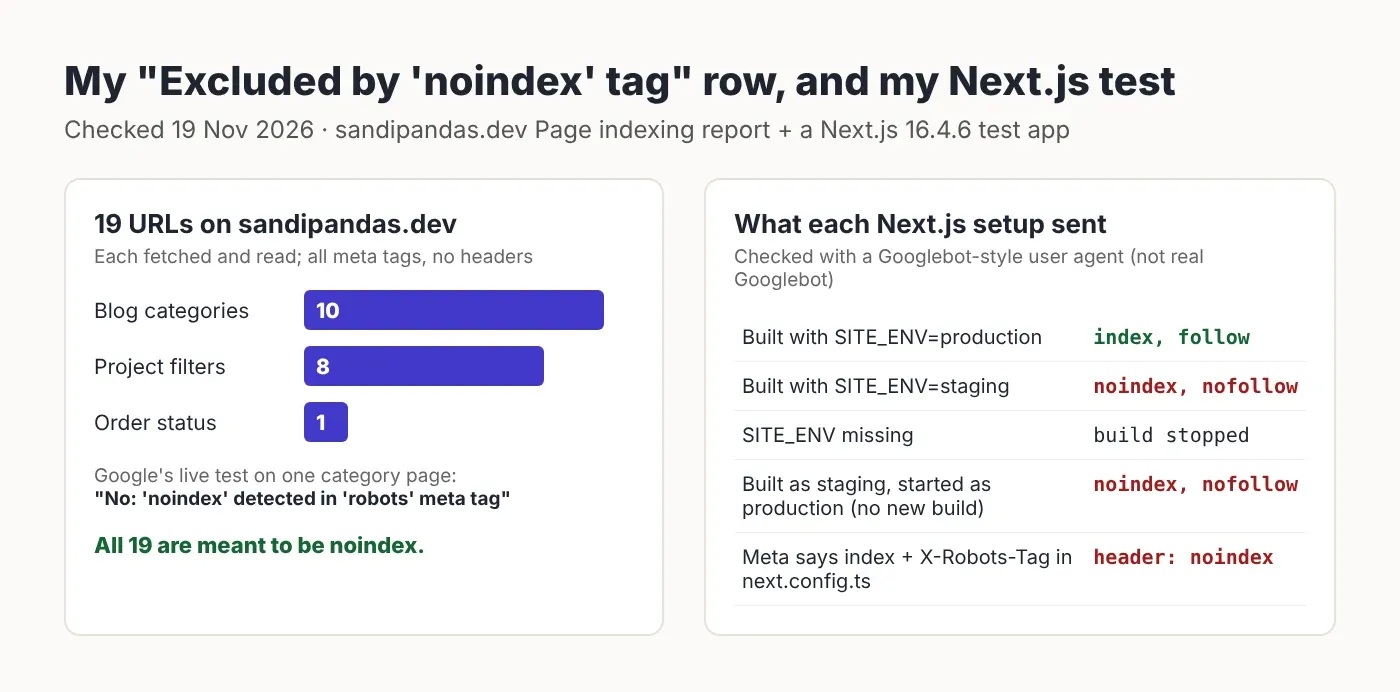
This row isn't always a problem. On my own site, all 19 URLs in it are pages I want out of Google.
I opened the Page indexing report for sandipandas.dev today (19 November 2026; Google's data was last updated 16 November). "Excluded by 'noindex' tag" had 19 pages. I fetched every one and read its robots tag:
Pages in the row | What I found |
|---|---|
10 blog category pages (9 on www, 1 old copy without www) |
|
8 project filter pages, like |
|
1 order status page |
|
None of them sent an X-Robots-Tag header. My real posts sent index, follow. Then I ran Google's own check on one category page, and it agreed: "Indexing allowed? No: 'noindex' detected in 'robots' meta tag".
So sort your list into two piles first: pages you want in Google, and pages you don't (tag pages, filters, thank-you pages, logins, carts). The second pile is fine where it is. Only the first pile needs fixing. If you'd like someone to sort a long list like this for you, that's part of my website audit.
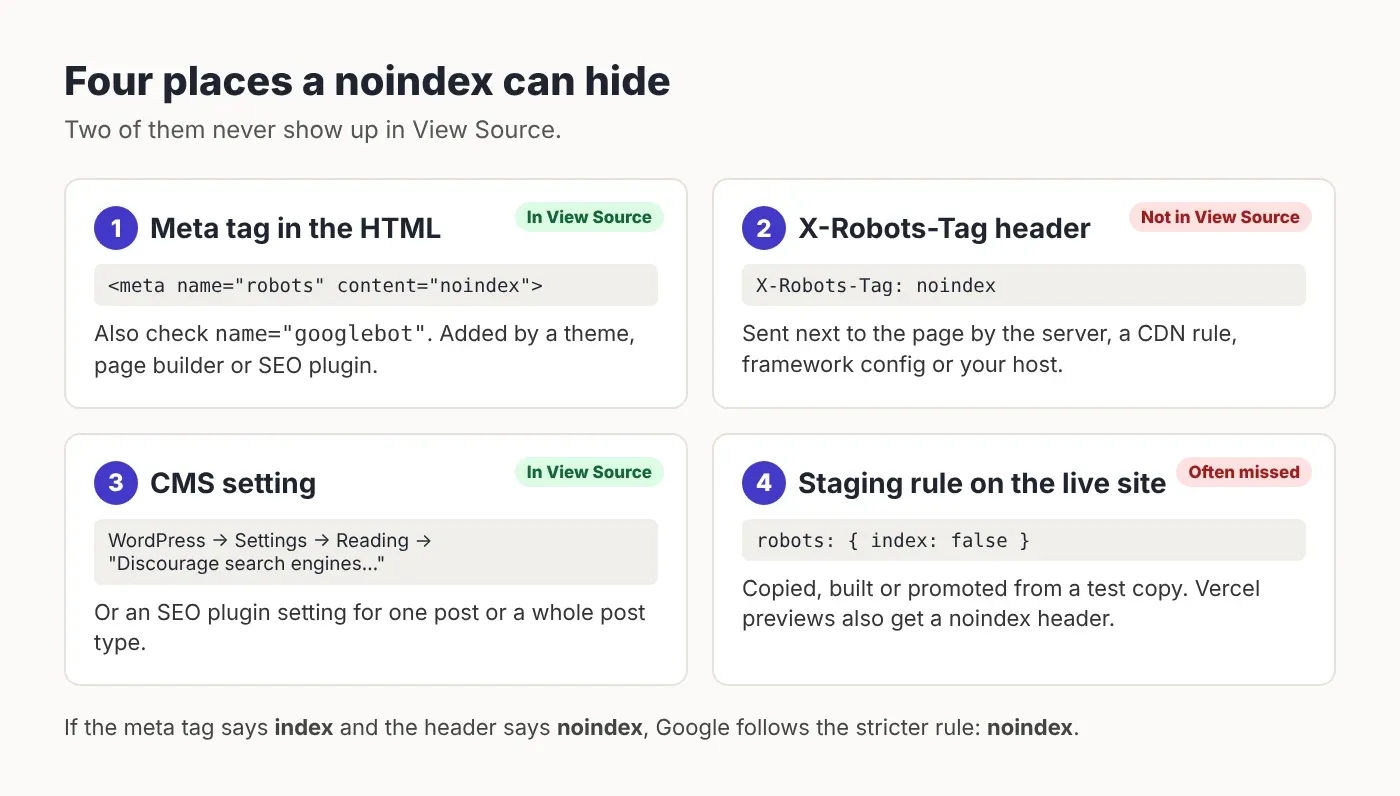
The four places a noindex hides
When a page you want is in the row, the rule is in one of four places. Two of them don't show up in View Source.
The meta tag in the HTML. Search the page source for
name="robots"andname="googlebot". Google reads both. A theme, a page builder or an SEO plugin may add it.The X-Robots-Tag header. It travels with the page, not inside it, so View Source can't show it. It can come from server settings (for example an
.htaccessfile, a settings file on Apache servers), a CDN rule (a CDN is a network that serves your site from many places), your framework's config, or your host.A CMS setting. In WordPress that's Settings → Reading → "Discourage search engines from indexing this site", or a setting in your SEO plugin for one post or a whole post type (posts, pages, products and so on).
A staging rule that reached the live site. A staging site is a private copy where you test changes. It should have noindex. The trouble starts when that rule is copied, built or promoted into the live site.
If two rules disagree, Google's robots meta tag docs say "the more restrictive rule applies". So a page with index in the HTML and noindex in the header is a noindex page. That's the classic "my page says index" case.
Check what Google sees, not what you see
Use Google's live test first. It fetches the page now and tells you where it found the noindex.
In Search Console, paste the full URL into the bar at the top (that's the URL Inspection tool).
Click Test live URL and wait a minute.
Under Page availability, read Indexing allowed? On my category page it said "No: 'noindex' detected in 'robots' meta tag", so I knew to look at the HTML, not the server.
Click View tested page to see the HTML and headers Google got.
The saved result (not the live test) shows what Google saw at its last crawl. If the live test says "Yes" but the saved one says "No", you've already fixed it and Google just hasn't been back.
For many pages at once, I use a small script. It asks for each page with a Googlebot-style user agent (the name a visitor sends to say what it is) and prints the status code (200 means OK, 3xx means a redirect), the X-Robots-Tag header and every robots meta tag. It is not Google: a site or firewall may treat real Googlebot differently, so confirm with the live test. It also reads only the HTML the server sends, not changes JavaScript makes later, and it looks for quoted name values only.
// scripts/check-noindex.mjs — shows the noindex rules for each URL.
// Usage: node scripts/check-noindex.mjs https://example.com/ https://example.com/about
// Needs Node 18+ (built-in fetch). Reads the first response only (no redirects followed).
const GOOGLEBOT_UA =
  'Mozilla/5.0 (Linux; Android 6.0.1; Nexus 5X Build/MMB29P) AppleWebKit/537.36 ' +
  '(KHTML, like Gecko) Chrome/131.0.0.0 Mobile Safari/537.36 ' +
  '(compatible; Googlebot/2.1; +http://www.google.com/bot.html)'

for (const url of process.argv.slice(2)) {
  const res = await fetch(url, { headers: { 'user-agent': GOOGLEBOT_UA }, redirect: 'manual' })
  const html = await res.text()
  const metaTags = html.match(/<meta[^>]+name=["'](robots|googlebot)["'][^>]*>/gi) ?? []
  console.log(url)
  console.log('  status:       ', res.status, res.headers.get('location') ?? '')
  console.log('  X-Robots-Tag: ', res.headers.get('x-robots-tag') ?? '(none)')
  console.log('  meta tags:    ', metaTags.length ? metaTags.join(' ') : '(none)')
}
Checked with Node 22.23 on 19 Nov 2026. If the status is a 3xx, run it again on the address in "location".
Next.js: one switch, set per environment
Don't hardcode noindex in a layout. Read it from one environment variable, and make the build fail if that variable is missing.
In the Next.js App Router (the app/ folder setup), a layout wraps every page under it, so a robots rule in the root layout lands on the whole site. An environment variable is a setting you give the site per place it runs (live, staging, your laptop). This is the setup I tested:
// lib/site.ts — one place that decides if this build may be indexed.
// Set SITE_ENV=production only on the live site. Anything else = noindex.
const siteEnv = process.env.SITE_ENV

if (!siteEnv) {
  // Fail the build instead of guessing. A silent guess is how a live
  // site ends up with noindex (or a staging site ends up in Google).
  throw new Error('SITE_ENV is not set. Use "production" on the live site, anything else elsewhere.')
}

export const allowIndexing: boolean = siteEnv === 'production'
// app/layout.tsx — robots rule comes from lib/site.ts, never hardcoded
import type { Metadata } from 'next'
import type { ReactNode } from 'react'
import { allowIndexing } from '@/lib/site'
export const metadata: Metadata = {
title: { default: 'Test site', template: '%s | Test site' },
robots: allowIndexing
? { index: true, follow: true }
: { index: false, follow: false },
}
export default function RootLayout({ children }: { children: ReactNode }) {
return (
<html lang="en">
<body>{children}</body>
</html>
)
}Checked with Next.js 16.4.6, React 19.3.1 and TypeScript 7.0.2: the build (next build) and the strict type check (tsc --noEmit) both pass. The robots field is the one in the Next.js metadata docs.
Here is what my test app sent, checked with the script above:
Setup | What every page sent |
|---|---|
Built with SITE_ENV=production |
|
Built with SITE_ENV=staging |
|
SITE_ENV missing | Build stopped with my error. Nothing shipped. |
Built as staging, then started with SITE_ENV=production (no new build) | Still |
Meta tag | Meta |
Two of those rows matter most. First, on pages Next.js builds ahead of time, the rule is fixed at build time. If you build once for staging and reuse that same build for the live site, the noindex comes with it. Build again with the live setting. Second, a header rule hides well. This is the line to search your code for:
// next.config.ts — the kind of rule that hides a noindex from View Source
headers: [{ key: 'X-Robots-Tag', value: 'noindex' }]
Vercel: previews get a header you didn't write
If you host on Vercel, some addresses get X-Robots-Tag: noindex from Vercel itself.
Vercel's guide on preview indexing says it adds that header to preview deployments (test copies made for each branch) and to production deployments opened through their own unique deployment address. It does not add it when a preview is served from your own domain that you've assigned to a Git branch (a separate line of work in your code), such as a staging subdomain. So:
If Google lists a preview or deployment address on vercel.app in this row, that's expected. Make sure your real domain is the one you link to and list in your sitemap.
A staging subdomain on its own domain is not covered. Protect it with a password, or add the header yourself for that environment.
WordPress: one checkbox, and your SEO plugin
Untick "Discourage search engines" on the live site, then check your SEO plugin's settings for the post type.
WordPress's own core notes say that since version 5.3, sites with that box ticked show <meta name='robots' content='noindex,nofollow' />, and the old Disallow: / line in robots.txt was removed for them. Since 5.7, the code behind it is a function called wp_robots_no_robots. Your SEO plugin can also set noindex per post, per category or for a whole post type, so check its settings for the type of page Google listed. I did not run a WordPress test today; this part comes from WordPress's own docs and code.
After the fix: tell Google
Make sure Google can fetch the page, run the live test again, then ask Google to check.
Check robots.txt doesn't block the page. robots.txt is a file that tells crawlers what not to fetch. Google says that if the page is blocked there, "the crawler will never see the noindex rule", so it can't see you removed it either.
Run the live test. "Indexing allowed?" should now say Yes.
For one or two pages, click Request indexing. For many pages, open the row in the Page indexing report and click Validate fix. Google's Page indexing report help says "Validation typically takes up to about two weeks, but in some cases can take much longer".
Allowed to index isn't the same as indexed.
A noindex in the header beats an "index" in the HTML. Check what the server sends, not only what the page says.
What's easy to get wrong
Fixing pages you meant to hide. Tag, filter and thank-you pages belong in this row. Sort first.
Checking only View Source. Headers don't show there. Use the live test or the script.
Blocking in robots.txt and adding noindex. Google can't read the noindex on a page it isn't allowed to fetch.
Reusing a staging build for the live site. In my test the noindex stayed after I changed the setting without building again.
What I tested, and what I didn't
Tested on 19 Nov 2026: my site's Page indexing report and all 19 URLs in the row (browser fetch while logged out), one URL in Google's live test (it crawled as "Google Inspection Tool smartphone"), and a Next.js 16.4.6 test app on a cloud test server, checked with the script above using a Googlebot-style user agent. Not tested: real Googlebot on the test app, how Google reports a header-only noindex in Search Console, a live Vercel preview, WordPress itself, and other search engines.
Read next
If you'd rather have someone do this
I've been building and fixing websites since 2017, across 900+ projects, and Search Console clean-ups are a regular part of my technical SEO work. If your important pages are stuck in this row and you'd rather not dig through headers yourself, book a short call and we'll look at it together.
Questions
Questions this post answers
Is "Excluded by noindex tag" bad for SEO?
- Not by itself. It only means Google found a noindex rule (an instruction not to list the page) and left those pages out. For tag pages, filters, logins or thank-you pages that's what you want. It's only a problem when a page you want people to find is in the list. Open the row, look at the example URLs, and fix only those.
Why does my page say index but Google says noindex?
- The noindex may be somewhere you didn't look: an X-Robots-Tag header (a note the server sends with the page) from the server, host or framework config, or a second meta tag named "googlebot". Google follows the stricter rule when two disagree. Run the URL Inspection live test in Search Console; "Indexing allowed?" tells you whether it found the rule in a meta tag or a header.
How long does it take after I remove noindex?
- Google has to fetch the page again first. For one page, Request indexing in URL Inspection (Search Console's page checker) asks it to. For many pages, Validate fix in the Page indexing report starts a check that Google says typically takes up to about two weeks, and sometimes much longer. Being allowed to index doesn't mean Google will index every page.
Should I use robots.txt or noindex to hide a page?
- Use noindex to keep a page out of Google's results, and keep the page open to crawling (fetching) so Google can read the rule. robots.txt (the file that tells crawlers what not to fetch) stops crawling, not listing, and a blocked page can't show its noindex. For private pages, a login is safer than either.
How do I check for an X-Robots-Tag header?
- Use the URL Inspection live test in Search Console and click View tested page to see the headers Google got. On your own computer, run the script above, or curl -I with the page address (curl is a command-line tool that fetches a page; -I shows only its headers). Look for a line starting with X-Robots-Tag.