
WordPress
Indexed, though blocked by robots.txt? Fix it in WordPress
robots.txt controls where Google may go, not what it may show

You blocked a page in robots.txt (the file that tells search engine robots where they may go), and Search Console (Google's free report on your site) now says Google indexed it anyway. It feels like Google ignored you. It didn't. Below: what the warning really means, the one question that decides the fix, and the WordPress robots.txt mistakes I tested today.
What does "Indexed, though blocked by robots.txt" mean?
It means Google has put a page in its search index (its list of pages it can show) even though your robots.txt file tells Google not to visit it. Google obeyed the file and did not read the page, but other links told it the page exists. The fix depends on one thing: do you want this page in Google or not?
Google's own Page indexing help page says it plainly: Google always respects robots.txt, "but this doesn't necessarily prevent indexing if someone else links to your page." Google won't crawl the page (download and read it), but it can still index the address using what the linking page says about it. So the search result usually has a very limited snippet (the short text under the title), or none.
The row sits under "Improve page appearance", and Search Console calls it "a non-critical issue". Not an emergency, but a sign that your robots.txt and your plans for that page don't match.
Why robots.txt can't keep a page out of Google
robots.txt controls visiting, not showing. Google's robots.txt introduction says the file "is not a mechanism for keeping a web page out of Google". To keep a page out, Google says to use noindex or put the page behind a password.
noindex is a rule in the page itself, as a robots meta tag (a hidden line in the page's code) or an HTTP header (a note the server sends with the page). It says "don't show this page in search". The catch: Google has to crawl the page to see it. Google's noindex guide warns that if robots.txt blocks the page, "the crawler will never see the noindex rule, and the page can still appear in search results".
The same mistake on my own site
I checked my own site, sandipandas.dev, on 25 November 2026. The Page indexing report (data last updated 16 November) shows one page in this row: the site search page, /search, first detected on 14 November.
The reason: my robots.txt has Disallow: /search, and the /search page also sends a robots meta tag saying noindex, nofollow. That's the exact clash Google warns about. The noindex is there, but Google isn't allowed to read it.
URL Inspection (the Search Console tool that shows what Google knows about one address) told a newer story today: "URL is not on Google", "Crawl allowed? No: blocked by robots.txt", last crawl attempt 12 November, found through a link on my own HTML sitemap page. So by today the page was out of Google's index anyway. Fine for a search page, but that was Google's own choice. My noindex never did anything.
The right fix is to remove Disallow: /search so Google can read the noindex. On my site that line lives in the code, not in a setting, so it needs a developer change. I'm showing it as it is today because it's a real example, not a made-up one.
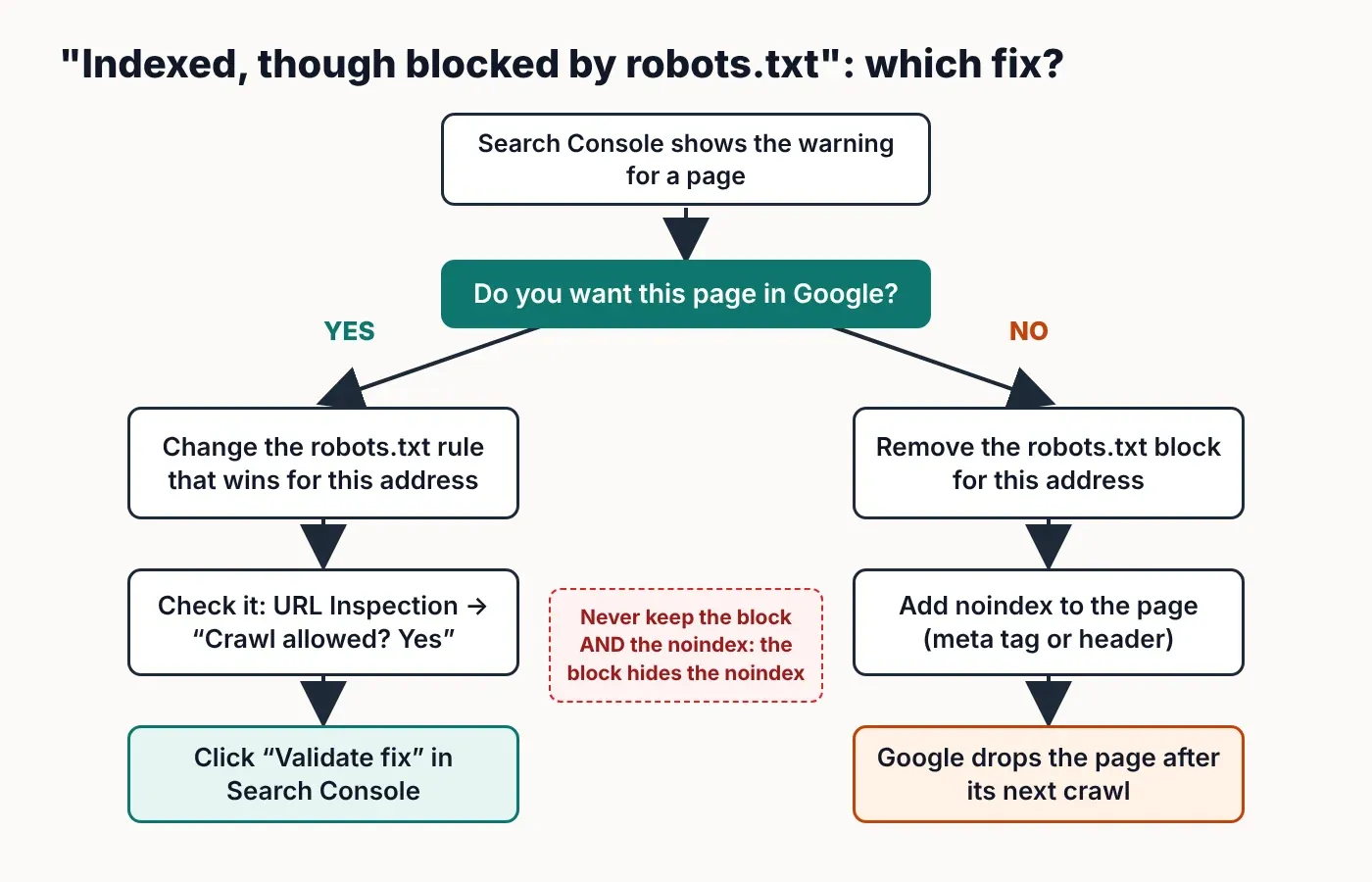
First decide: do you want this page in Google?
If you want the page in search, change robots.txt so Google may crawl it. If you don't, still remove the robots.txt block, then add noindex so Google can read it. Never keep the block and the noindex together: the block hides the noindex.
Your goal | What to do |
|---|---|
I want this page in Google (a product, a service page, a blog post) | Find the robots.txt rule that blocks it and change it. Check the result in URL Inspection, then click "Validate fix" in the report. |
I don't want this page in Google (a thank-you page, a search page, a login page) | Remove the robots.txt block for it, then add noindex to the page. Google drops the page after its next crawl. |
These are the two paths Google's help page gives: unblock the page, or "remove the robots.txt block and use 'noindex'".
One honest exception. Google says robots.txt is used "mainly to avoid overloading your site with requests". If a blocked section has thousands of addresses, like filter or search pages on a big shop, keeping it blocked can be a fair trade. You may see a few of those addresses in this report, and you can live with that.
Find the rule that blocks the page
Start in Search Console: URL Inspection tells you if robots.txt blocks a page, and the robots.txt report shows the copy of the file Google is using. Then work out which line wins, using Google's order: the longest matching rule wins, and on a tie, Allow wins.
Paste the address from the report's "Examples" table into URL Inspection and look for "Crawl allowed? No: blocked by robots.txt". Then open Settings → robots.txt report: that's the copy Google holds, not the one you just edited. Read it using the order in Google's robots.txt specification:
Rules match from the start of the path. The path is the part of the address after the domain, like /about/feedback/. Google's own example: a rule for
/fishmatches "any path that starts with /fish", so it also covers /fish.html and /fishheads.The most specific rule wins, "based on the length of the rule path".
On a tie, the less strict rule wins. Google says that when rules conflict it "uses the least restrictive rule", so Allow beats Disallow.
Only one group of rules counts for each robot. A group starts with a User-agent line (the robot's name; * means every robot). If there's a group for Googlebot (Google's main crawler), Googlebot follows only that one and ignores the * group.
Paths care about capital letters. /Private/ and /private/ are different.
To check this quickly, I wrote a small script that follows the order above. I tested it against all seven examples in Google's "Order of precedence for rules" section, Google's capital-letter example, and the cases in the longest-match test from Google's open-source robots.txt parser on GitHub (I read those cases as data; I didn't build Google's parser). All 21 checks gave Google's answer. It is still a helper, not Google itself: it doesn't handle encoded characters (like %20 for a space) the way Google does, and the robots.txt report and URL Inspection always have the last word.
// which-rule.mjs — which robots.txt rule wins for a URL, using the
// precedence Google documents: the longest matching path wins; on a tie,
// allow wins. Handles * and $ and picks the user-agent group the way
// Google describes. A checking aid, not Google's own parser.
// Usage: node which-rule.mjs robots.txt "/some/path" [user-agent]
import { readFileSync } from "node:fs";

/** @typedef {{ type: "allow" | "disallow", path: string }} Rule */
/** @typedef {{ agents: string[], rules: Rule[] }} Group */

/** @param {string} text @returns {Group[]} */
export function parseGroups(text) {
  /** @type {Group[]} */
  const groups = [];
  /** @type {Group | null} */
  let current = null;
  let lastWasAgent = false;
  for (const raw of text.split(/\r\n|\r|\n/)) {
    const line = raw.replace(/#.*$/, "").trim();
    const m = line.match(/^([A-Za-z-]+)\s*:\s*(.*)$/);
    if (!m) continue;
    const field = m[1].toLowerCase();
    const value = m[2].trim();
    if (field === "user-agent") {
      if (!lastWasAgent || !current) { current = { agents: [], rules: [] }; groups.push(current); }
      current.agents.push(value.toLowerCase());
      lastWasAgent = true;
    } else if ((field === "allow" || field === "disallow") && current) {
      current.rules.push({ type: field, path: value });
      lastWasAgent = false;
    } else {
      lastWasAgent = false;
    }
  }
  return groups;
}

/** @param {string} pattern @param {string} path */
export function matches(pattern, path) {
  if (pattern === "") return false;
  const anchored = pattern.endsWith("$");
  const body = anchored ? pattern.slice(0, -1) : pattern;
  const re = body.split("*").map((s) => s.replace(/[.+?^${}()|[\]\\]/g, "\\$&")).join(".*");
  return new RegExp("^" + re + (anchored ? "$" : "")).test(path);
}

/** @param {string} text @param {string} path @param {string} userAgent */
export function check(text, path, userAgent = "googlebot") {
  const ua = userAgent.toLowerCase();
  const groups = parseGroups(text);
  // A group naming this crawler wins over "*"; groups with the same name are merged.
  // Google ignores anything after the name (googlebot/1.2 = googlebot).
  const name = (/** @type {string} */ a) => (a.match(/^[a-z_-]+/) ?? [""])[0];
  const named = groups.filter((g) => g.agents.some((a) => name(a) === ua));
  const chosen = named.length ? named : groups.filter((g) => g.agents.includes("*"));
  /** @type {Rule | null} */
  let winner = null;
  for (const g of chosen) for (const r of g.rules) {
    if (!matches(r.path, path)) continue;
    const longer = !winner || r.path.length > winner.path.length;
    const tieAllow = winner && r.path.length === winner.path.length && r.type === "allow";
    if (longer || tieAllow) winner = r;
  }
  return { allowed: !winner || winner.type === "allow", rule: winner, group: named.length ? ua : "*" };
}

if (process.argv[1] && process.argv[1].endsWith("which-rule.mjs") && process.argv.length >= 4) {
  const [file, path, ua = "googlebot"] = process.argv.slice(2);
  const r = check(readFileSync(file, "utf8"), path, ua);
  const rule = r.rule ? `${r.rule.type}: ${r.rule.path}` : "no rule matches";
  console.log(`${r.allowed ? "ALLOWED" : "BLOCKED"}  ${path}  (group "${r.group}", winning rule: ${rule})`);
}
Checked on 25 November 2026 with Node.js 22.23 (Node.js runs JavaScript outside the browser), and type-checked with TypeScript 5.9 in strict mode. Save your robots.txt next to it and run:
node which-rule.mjs robots.txt "/about/feedback/"
# BLOCKED  /about/feedback/  (group "*", winning rule: disallow: /*/feed)
The WordPress robots.txt mistakes I tested
I ran six WordPress-style robots.txt rule sets through the script on 25 November 2026. Three common edits did something their owners didn't mean: a feed rule without a trailing slash, an Allow line that misses the address without its slash, and a separate Googlebot group.
The first set is WordPress's default, taken from the do_robots() source, not from a live install.
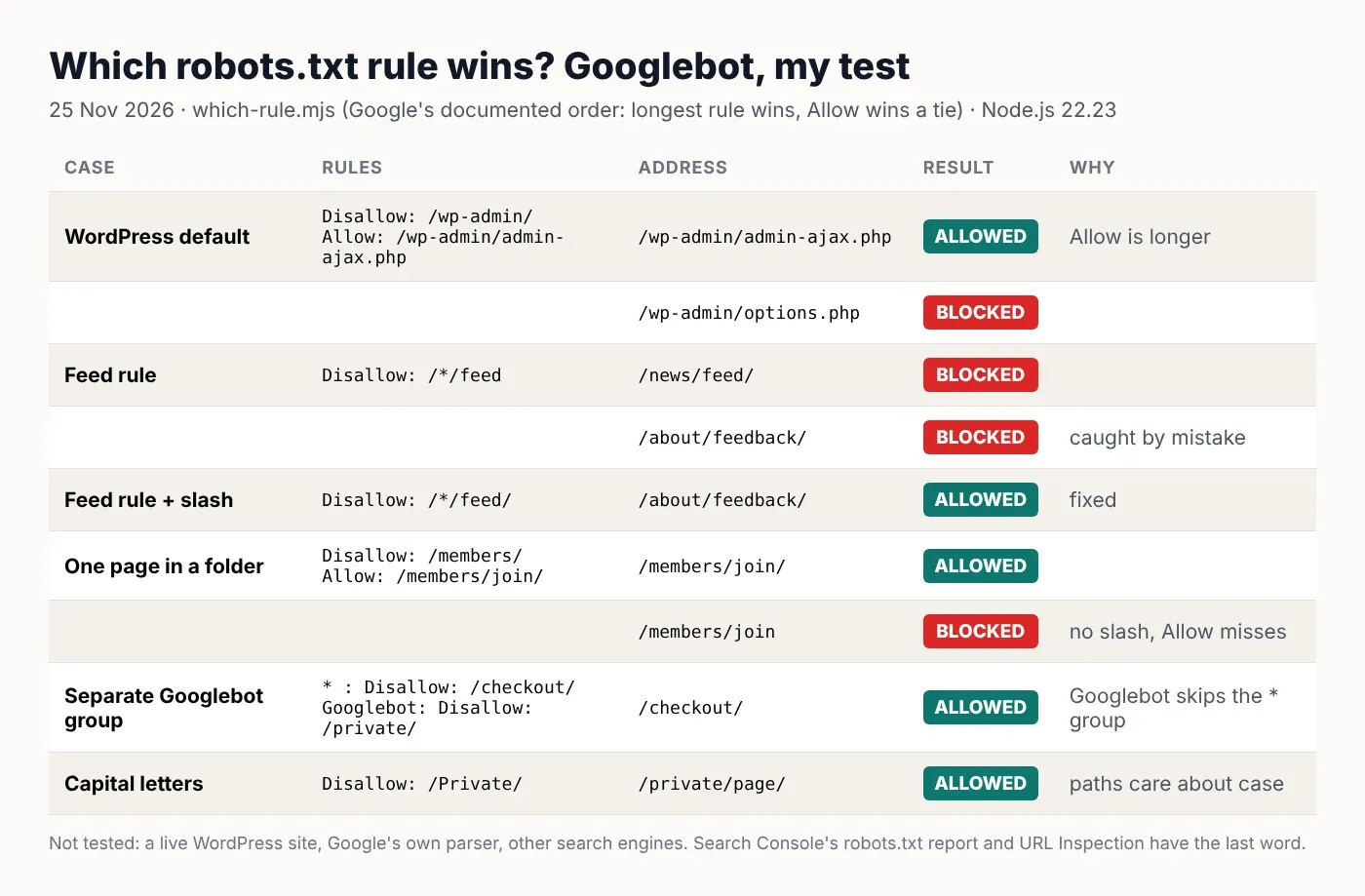
WordPress default (
Disallow: /wp-admin/+Allow: /wp-admin/admin-ajax.php): admin-ajax.php is allowed because the Allow is longer; /wp-admin/options.php is blocked; /about/ is allowed because no rule matches.Disallow: /*/feed: /news/feed/ is blocked, and so is /about/feedback/, by mistake.Disallow: /*/feed/(slash added): /news/feed/ is blocked; /about/feedback/ is allowed.Disallow: /members/+Allow: /members/join/: /members/join/ is allowed, but /members/join (no slash) is blocked, because the Allow doesn't match it.A * group with
Disallow: /checkout/and a Googlebot group withDisallow: /private/: /checkout/ is allowed for Googlebot, because it only reads its own group. Other robots are blocked.Disallow: /Private/: /private/page/ is allowed, because the capital P doesn't match.
The feed case is real. On the WordPress.org forum, a site owner found Disallow: /*/feed behind a page flagged with this warning. The rule was meant for feeds, but it matches any path that has "/feed" after a folder, so a page like /about/feedback/ gets caught too. They asked if Allow: /*/feedback* would help. For Google it would: I checked that too, and the longer Allow wins. The cleaner fix is a Disallow that says what you mean: WordPress feed addresses usually end in /feed/, so Disallow: /*/feed/ blocks feeds and leaves /about/feedback/ alone.
The Googlebot group catches people out the most. Add a small Googlebot section for one folder, and Googlebot stops following every rule in the * group. If you need a Googlebot group, copy the * rules into it too.
How to fix it in WordPress, step by step
First find where your robots.txt really comes from. Then change the rule, or remove it and add noindex. Then test the address in URL Inspection and click "Validate fix" in Search Console.
Find the source of the file. By default WordPress makes a "virtual" robots.txt: no real file, just text WordPress writes when asked. It only blocks /wp-admin/ and allows /wp-admin/admin-ajax.php (WordPress's file for background requests). Plugins can change it through the robots_txt filter (a hook that lets code edit the output), and many SEO plugins add a robots.txt editor (a plugin feature, not WordPress itself). This isn't in the official docs, but it's widely reported: on most hosts, a real robots.txt file in your site's main folder is sent instead, and WordPress's version is never used. Check your plugin settings and hosting file manager before you edit.
If you want the page in Google: change the rule that wins for that address. Make Disallow lines more exact (add the trailing slash, fix capital letters) rather than stacking Allow lines. Test the new file with the script.
If you don't want the page in Google: remove the Disallow that covers it, then add noindex to the page. Many SEO plugins have a per-page "noindex" option (again, a plugin feature, so check yours). Without a plugin, a developer can add it with WordPress's wp_robots filter, which has existed since WordPress 5.7. Never put "noindex" inside robots.txt: Google says a noindex rule in robots.txt "is not supported".
Check the "Search engine visibility" box. In Settings → Reading, "Discourage search engines from indexing this site" no longer adds
Disallow: /to robots.txt. Since WordPress 5.3 it uses a robots meta tag instead (it's in the do_robots() changelog). So if your robots.txt saysDisallow: /, a plugin or a real file put it there. I covered this setting in how to check robots.txt.Tell Google. Run "Test live URL" in URL Inspection. You can also request a robots.txt recrawl in the robots.txt report, though Google's robots.txt report help says you "generally don't need to" and that it "doesn't guarantee an immediate recrawl of unblocked URLs". Then click "Validate fix" on the row.
If your robots.txt is spread across a theme, two plugins and a leftover file, and you can't tell which one is live, that's exactly what we untangle in a website audit.
robots.txt decides where Google may go. noindex decides what Google may show. A blocked page can't tell Google anything, including "don't show me".
What's easy to get wrong
Blocking a page you've also set to noindex. Like my /search page above.
Expecting the warning to clear straight away. Google says it "generally caches" robots.txt "for up to 24 hours", and the Page indexing report's own help page says validation "typically takes up to about two weeks, but in some cases can take much longer".
Trusting old report data. My report (data from 16 November) said "indexed"; URL Inspection on 25 November said "not on Google". Check the "Last update" date.
A Googlebot group for one small rule. Googlebot then ignores the * group.
Editing the wrong file. www and non-www, http and https each have their own robots.txt.
I've built websites since 2017, 900+ projects with my team in Kolkata. robots.txt is the shortest file on most of them, and one wrong character still changes what Google can read.
Read next
If you'd rather have someone do this
Want a second pair of eyes on your robots.txt, plugin settings and the pages Google flags? Book a short call. I'll tell you honestly if it needs a fix at all. Schedule a meeting.
Questions
Questions this post answers
Is "Indexed, though blocked by robots.txt" bad for SEO?
- Search Console calls it a non-critical issue. It only matters for two kinds of pages. If you want the page to rank, the block stops Google reading it, so the result shows little or no text under the title. If you want the page hidden, robots.txt (the file that tells robots where they may go) won't hide it. Use noindex instead.
Should I use robots.txt or noindex?
- They do different jobs. robots.txt controls which addresses Google may visit. noindex, a tag or header on the page, tells Google not to show the page in search. To keep a page out of Google, use noindex and leave the page open to crawling (visiting), because Google has to read the page to see the noindex.
How do I allow one page in robots.txt?
- Add an Allow line that matches the page and is longer than the Disallow line, for example Disallow: /members/ with Allow: /members/join/. Google uses the longest matching rule, and Allow wins a tie. Match the path exactly: in my test, Allow: /members/join/ did not cover /members/join without the slash.
How long until the warning goes away?
- Google says it generally caches (keeps a copy of) robots.txt for up to 24 hours. After that it has to crawl the page again. Once you click Validate fix, Google's help page says validation typically takes up to about two weeks, but in some cases can take much longer.
Does WordPress create a robots.txt file?
- Yes, a virtual one. There's no real file: WordPress writes the text when asked. The default blocks /wp-admin/ and allows /wp-admin/admin-ajax.php. Plugins can change it, and since WordPress 5.3 the "Discourage search engines" setting uses a noindex meta tag instead of adding Disallow: / to robots.txt.