SEO for Developers
Server error (5xx) in Search Console: does downtime hurt?
What Search Console showed when my own site went down, and how to close a site without losing pages from Google

For a few days in November, every page on my own website showed Google an error. Not a "server error (5xx)" — something Google treats as worse. Here is what Search Console (Google's free report on how it sees your site) recorded, what Google's own docs say happens to your rankings, and how to take a site down without losing pages from Google.
Does website downtime hurt Google rankings?
A short outage usually doesn't, if your server sends the right error. A 503 (a "server error" code) tells Google to come back later, and pages already in Google stay for a while. A 402, 403 or 404 makes Google treat the page as gone and remove it from its index (its list of pages it can show).
A page that drops out of the index can't rank at all. Google's docs on this don't talk about rankings — they talk about pages being kept or removed, and that is where downtime really hurts.
What "Server error (5xx)" in Search Console means
It means Google asked your server for a page and your server answered with an error code starting with 5. Every time a browser or a crawler (a program like Googlebot that fetches pages) asks for a page, the server replies with a three-digit status code. 200 means "here it is". Codes starting with 4 blame the request; codes starting with 5 blame the server.
In Search Console you can meet this error in two places:
Pages report (Indexing > Pages): a row called "Server error (5xx)" lists pages Google couldn't index because the server failed. Google's help page says simply: "Your server returned a 500-level error when the page was requested."
Crawl stats (Settings > Crawl stats): the "By response" table counts every request Google made, grouped by the answer it got — OK (200), Server error (5XX), Other client error (4XX) and so on. Click any row to see example URLs with dates and times.
The catch: if your site is down but sends a 4xx code, you will see nothing under "Server error (5xx)". That is exactly what happened to me.
My site went down. Here's what Google saw
My host paused the site and sent a 402 error, so Search Console logged a burst of 4xx errors — not 5xx — and 5 URLs were marked "Blocked due to other 4xx issue". My website runs on Vercel (a hosting service for Next.js sites). When my automated daily check opened the site on the evenings of 16 and 17 November 2026, every page — the home page, the blog, even my admin dashboard — returned HTTP 402 with the header x-vercel-error: DEPLOYMENT_DISABLED. Vercel's DEPLOYMENT_DISABLED page lists this error as "402 — Payment required", and links it to usage limits and plan changes. By 19 November the site was back.
On 28 November 2026 I opened Search Console for sandipandas.dev and wrote down what it recorded:
What I checked | What Search Console showed |
|---|---|
Crawl stats, "Server error (5XX)" | 1 request in the whole period (1 September). Nothing during the outage. |
Crawl stats, "Other client error (4XX)" | 72 requests. The examples are dated 14 to 18 November, except one from 31 October. |
Pages report, "Server error (5xx)" | 0 pages |
Pages report, "Blocked due to other 4xx issue" | 5 URLs, first detected 17 November, last crawled 15–18 November |
Indexed pages (Pages report chart) | 284 on 12 November, 279 on 15 November, 275 on 17 November — still 275 on 20 and 23 November |
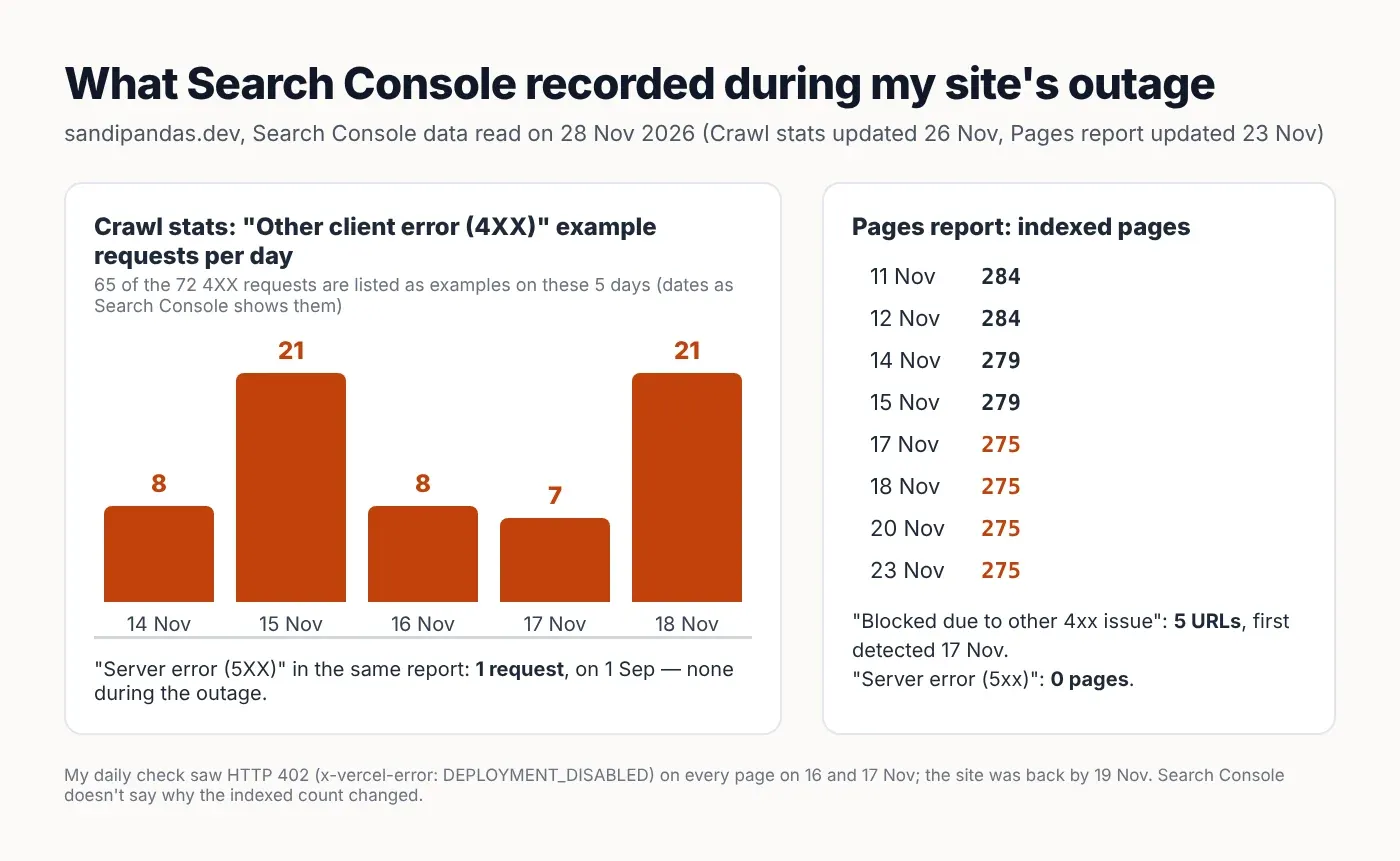
Two honest notes. First, I can't prove that all 9 lost pages were caused by the outage — Search Console doesn't say why a count changes — but the drop happened in the same days. Second, my site gets very little search traffic (29 web search clicks in the last three months), so it's too small to show a clear ranking change. What it does show clearly is how Google labels the outage.
I also re-checked those 5 URLs today. The www versions of /about and /skills load fine again, so they should recover when Google crawls them next. Two (/home and /login) aren't pages meant for search anyway: /home doesn't exist and /login is my sign-in page. The fifth turned out to be a blog post that isn't public, so it shows Google a 404 (not found) whatever the outage did — a separate problem.
Why a 402, 403 or 404 hurts more than a 503
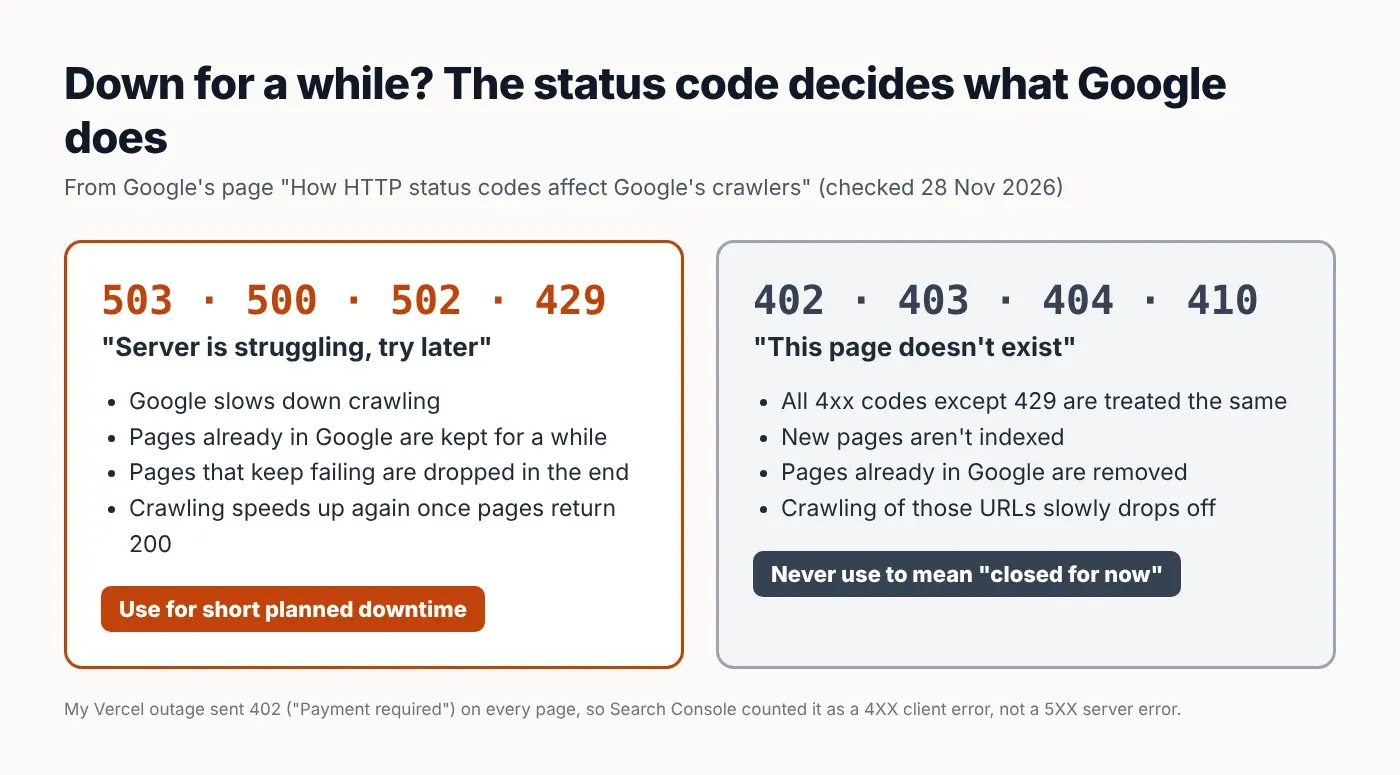
Google's crawler treats almost every 4xx code as "this page doesn't exist", but treats 5xx codes (and 429) as "the server is struggling, try later". This comes straight from Google's page on how HTTP status codes affect Google's crawlers:
Status your site sends | What Google does (from Google's docs) |
|---|---|
503, 500, 502 (5xx) | Crawlers "temporarily slow down". "Already indexed URLs are preserved in the index, but eventually dropped." URLs that "persistently return a server error" are removed. |
429 (too many requests) | Treated as a sign the server is overloaded — "considered a server error". |
402, 403, 404, 410 and other 4xx | "All 4xx errors, except 429, are treated the same." Google doesn't index them, and pages already indexed "are removed from the index". |
200 (OK) again | For 5xx: "Google gradually increases the crawl rate" once the server responds with 2xx again. |
So a "Payment required" or "Forbidden" page from your host is, in Google's eyes, the same as deleting the page. A 503 is the polite "closed for a bit" sign.
How long can a site be down before it loses pages?
Google gives no exact number, but its guide on pausing a website says a 503 is for urgent closures of "1-2 days", and that disabling a whole site should last "a few days at most". For anything longer, Google's guide to pausing a website recommends keeping a real home page online with a normal 200 status, so people and Google can still find you. It also warns that removing a site from Google's index "can take quite some time to recover from", with "no fixed time" and "no mechanism to speed that up".
This isn't in Google's docs, but it's widely reported that short 5xx outages usually leave no lasting mark once pages return 200 again.
How to take your site down the safe way
Send a 503 with a Retry-After header, keep robots.txt working, and never let a 4xx page stand in for "closed". A header is a short line of extra information the server sends with a page. The Retry-After header tells visitors and bots how long you expect to be down, in seconds or as a date.
WordPress: already built in
When WordPress updates itself, it shows "Briefly unavailable for scheduled maintenance. Check back in a minute." Its wp_maintenance() function sends exactly what Google wants: a 503 code and Retry-After: 600 (10 minutes). One catch from the same source code: if you add your own wp-content/maintenance.php page to change that message, WordPress loads your file and stops before sending its own 503 and Retry-After. Your file must send them itself.
Next.js: one small proxy file
In Next.js 16, a "proxy" (the file that used to be called middleware) runs before every page and can answer straight away. This version switches maintenance on with an environment variable (a setting you change in your host's dashboard, not in the code), and leaves robots.txt alone:
// proxy.ts — checked with Next.js 16.4.6, Node 22, TypeScript strict
import { NextResponse, type NextRequest } from 'next/server'

// Turn maintenance on by setting MAINTENANCE_MODE=on in your host's
// environment variables. RETRY_AFTER_SECONDS is your best guess of how
// long the site will be down, in seconds (3600 = one hour).
const page = `<!doctype html>
<html lang="en"><head><meta charset="utf-8"><title>Back soon</title>
<style>body{font-family:system-ui,sans-serif;max-width:36rem;margin:4rem auto;padding:0 1rem}</style>
</head><body><h1>We'll be back soon</h1>
<p>The site is down for planned work. Please try again in about an hour.</p>
</body></html>`

export function proxy(request: NextRequest): NextResponse {
  if (process.env.MAINTENANCE_MODE !== 'on') {
    return NextResponse.next()
  }
  const retryAfter: string = process.env.RETRY_AFTER_SECONDS ?? '3600'
  return new NextResponse(page, {
    status: 503,
    headers: {
      'Content-Type': 'text/html; charset=utf-8',
      'Retry-After': retryAfter,
      'Cache-Control': 'no-store',
    },
  })
}

export const config = {
  // Run on every path EXCEPT robots.txt and Next.js build files.
  // Google says never to send a 503 for robots.txt.
  matcher: ['/((?!robots\\.txt|_next/static|_next/image|favicon\\.ico).*)'],
}
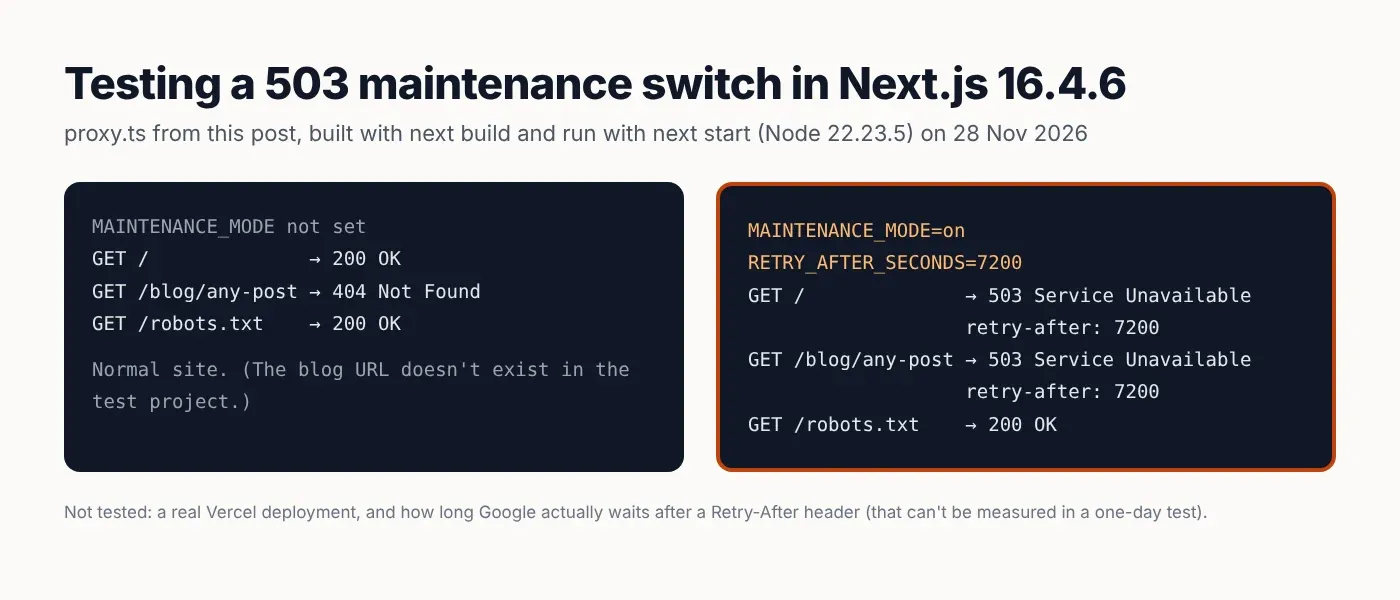
I built and ran this today in a test project. With the variable off, the home page gave 200. With MAINTENANCE_MODE=on, both the home page and a blog URL gave 503 Service Unavailable with retry-after: 7200 (the value I set), and /robots.txt still gave 200. On Vercel, remember its docs say changes to environment variables "only apply to new deployments", so redeploy after you switch it on or off. What I did not test: a real Vercel deployment, and how long Google actually waits after seeing a Retry-After header.
Any other host: the checklist
Make every page return 503, not 200, 403 or 404.
Add a Retry-After header with your best guess.
Keep robots.txt (the file that tells bots what they may crawl) returning 200. Google's guide says a 503 on robots.txt "blocks all crawling", and you can check yours with my free Robots & Sitemap Checker.
Confirm it with a real request, for example
curl -I https://www.example.com/, and look for503 Service Unavailable.If the closure will last more than a day or two, switch to a simple home page that returns 200 instead.
What to check after the site is back
Confirm your pages return 200, ask Google to recheck the important ones, and watch Crawl stats and the Pages report for the next few weeks.
Open your home page and a few key pages in a private window. They must load normally.
In Search Console, run URL Inspection (the search bar at the top) on your home page, then click Test live URL. It should say the URL is available to Google. Then click Request indexing for your most important pages only.
Open Settings > Crawl stats > By response. Click the 4XX and 5XX rows and note the dates. That tells you exactly when Google hit the outage.
In Indexing > Pages, look at "Server error (5xx)" and "Blocked due to other 4xx issue". Once the pages work again, click Validate fix so Google rechecks them.
Find the cause and stop it happening again — billing alerts from your host, an uptime monitor that emails you, or a care plan where someone else watches it.
If you'd like a second pair of eyes on what the outage left behind, my team's website audit covers Search Console errors like these.
What's easy to get wrong
Thinking "no 5xx errors" means "no damage". My outage showed zero server errors, because the host sent a 4xx. Always check the 4XX row in Crawl stats too.
A pretty "we'll be back" page that returns 200. Google's docs say a 200 page whose content looks like an error may be reported as a "soft 404" (a page that says "not found" but sends 200), and every page now shows the same "closed" message.
Closing the site with 403 or 404, or a noindex tag. Google's pausing guide lists these as things that "will remove the website's URLs from Google Search".
Sending 503 for robots.txt. That stops all crawling. Leave it alone.
A custom WordPress maintenance.php without a 503. Core's 503 only runs when you don't have that file.
Leaving maintenance mode on for weeks. 5xx is only safe for a short time. Pages that "persistently" fail get dropped.
Downtime isn't what loses your pages. The wrong error code is.
Read next
If you'd rather have someone do this
I've been building and looking after websites since 2017 — over 900 projects with my team in Kolkata. If your site went down and Search Console now looks worrying, or you want maintenance set up properly before the next update, book a short call and we'll look at it together.
Questions
Questions this post answers
Does a 5xx server error hurt SEO?
- A few 5xx errors usually don't. Google's docs say 5xx codes make its crawler slow down, and pages already in its index are kept for a while. The risk comes when the errors go on: Google says URLs that "persistently return a server error" are removed from the index. So fix the cause quickly, then check Search Console's Crawl stats.
How long can a website be down before Google drops it?
- Google doesn't give a fixed number of hours or days. Its guide on pausing a website suggests a 503 (temporary error) for urgent closures of 1–2 days, and says disabling a whole site should last "a few days at most". For longer breaks, keep a simple home page online that returns 200 (OK), so Google still has something to show.
Is 503 or 500 better during maintenance?
- Use 503. Google treats 500, 502 and 503 the same way when crawling — all are 5xx server errors that slow it down. But 503 means "Service Unavailable", which says the break is temporary, and it pairs with the Retry-After header that tells bots when to come back. Google's own pausing guide asks for 503.
Why does Search Console show 4xx errors when my site was down?
- Because your host or firewall answered with a 4xx code instead of a 5xx. Hosting companies, security tools and paused accounts can send 402, 403 or 404 pages. Google treats almost all 4xx codes as "this page doesn't exist", so these show up as "Blocked due to other 4xx issue" or "Not found (404)", not as server errors.
Will my pages come back after the downtime is fixed?
- Usually, once they return 200 (OK) again and Google crawls them. Google says it "gradually increases the crawl rate" after 5xx errors stop. Pages removed after 4xx errors need to be crawled and indexed again, which has no fixed timeline. You can ask Google to recheck key pages with Request indexing, and use Validate fix in the Pages report.